
-May-13-2026-06-46-58-9400-PM.webp)
A blog is a critical component of your inbound marketing strategy — it’s the vehicle for driving traffic, generating leads, and establishing authority and trust... All in the early or middle stages of the buyer’s journey. But how do you know if it’s working?
With all that content, traffic, and leads you’re generating, are you aware that you’re sitting on a gold mine of valuable data? Enter... blog analytics.
Table of Contents
- Blog Analytics Tools
- What are blog analytics?
- Why Blog Analytics Matters
- Blog Analytics Metrics and Insights
- Frequently Asked Questions About Blog Analytics

TL;DR: Understanding blog analytics tells you what’s working and where to improve
Blog analytics is the process of tracking and analyzing your blog's search visibility, traffic, engagement, and conversions so marketing teams can understand what's working and improve results. The most useful blog analytics metrics include impressions, clicks, click-through rate, views, referral sources, engagement signals, and lead generation metrics.
.png)
6 Free Blog Post Templates
Save time creating blog posts with these free templates.
- "How-to" Post
- "What is" Post
- Listicle Post
- And More!
Download Free
All fields are required.
Form not available
You're all set!
Click this link to access this resource at any time.
What are blog analytics?
Data analytics refers to the act of analyzing data to gain valuable insights. Blog analytics is doing this in the context of a blog to measure and analyze post traffic, reader engagement, conversions, and more. By measuring performance based on data, you can identify what’s working, what’s not working, and why.
Why Blog Analytics Matters
Let’s say a key stakeholder in your company comes to you with this question: “How is the blog contributing to our goals?‘‘ They want to craft the marketing budget and put their dollars toward the activities that make the most difference to the bottom line.
Responding to their question with “Trust me” will not sway that individual to continue celebrating and investing in content marketing. By gathering and analyzing blog data, you can get a pulse on your blog’s:
- Search presence (such as impressions, clicks, and click-through rate )
- Traffic performance (based on total views and visits, individual post performance, and by referral source )
- Authority in your online niche (based on the number of inbound links )
- Readership engagement (by measuring time on page, bounce rate, social shares and comments, and subscriber count)
- Lead generation (by measuring CTA click-through rate, goal conversion rate, number of leads, and lead-to-customer conversion rate)
All of this data is leveraged as you prove the ROI of the blog and improve the performance of your blog content. You just have to know how to use it! Let’s dive deeper on this…
Blog Analytics Metrics and Insights
Let’s break down the individual blog metrics you should be tracking so you can start making incremental improvements and generate even more traffic and leads... based on data that’s right under your nose.
1. Organic Search Impressions
An “impression” is the number of times your post or page has been seen in the Search Engine Results Pages (SERPs). The higher your blog posts rank in the SERPs, the more visibility (and, as a result, traffic) your blog can earn through organic search.
If you have a low number of impressions, your search presence may not be strong enough to get the organic traffic numbers you’re after, and it’s your job to implement SEO best practices and create content around queries that people are searching for.
2. Organic Clicks
It’s not enough to simply be present on the SERPs, which is what impression data measures. Your content must be compelling enough to compel the searcher to click. The more organic clicks your content earns, the more traffic your blog receives.
If you’re finding that your clicks are low, first check your impressions. If impressions are low, too, you must work on increasing your impressions.
On the other hand, your impressions could be lower if your content is targeting a low-volume query (i.e., you can’t change search behavior and make people search for something more).
However, if you’re finding that your SERP positions and impressions are high and your clicks are low, you may have to work on your blog headline and meta-description to gain attention and earn more clicks.
3. Organic Click-Through Rate
Comparing organic impressions to clicks can be hard, but that’s where organic click-through rate comes in. This metric is the percentage of impressions that resulted in a click.
The higher the percentage, the more bang you get for your impressions buck. You can even have posts that get little traffic (because of low keyword volume) that rank highly, get a lot of impressions, and earn a high share of clicks from those impressions.
At the same time, you could rank lower for a high-volume query yet still drive a lot of traffic with a low click-through rate.
4. Total Views and Visits
A visit measures the number of times your website was seen by a user. Page views refer to the number of times a page was seen by a user. It’s important to keep in mind that there can be multiple page views for every visit since users can browse multiple pages in a single session.
These overall metrics can tell you:
- Whether blog traffic is trending up or down.
- Average number of page views per visit (i.e., whether a user is engaging with multiple pieces of your content when they do visit).
- Average views per post (how far your content goes on average).
5. Individual Post Performance
The number of views for individual blog posts can give you more granular data about how your audience responds to the different topics you’re blogging about.
Do you notice that posts about certain topics aren’t doing as well as others? This is likely an indication that those topics aren’t as important to your audience. If this is the case, you might want to publish fewer posts on those topics and more on topics that truly resonate with your target audience.
Blog post views can also help you identify other patterns and cues in your blog content. Does a certain title structure work better than others? Do posts that are more pontificating generate a better reaction than how-to type posts? Use all of these insights to inform your future posts to increase the value of your blog and generate better results.
6. Traffic Referral Source
Your blog’s referral sources will tell you which sites users are coming from and give you a sense of how people are finding your blog. Use this information to identify deficiencies in your blog’s visibility and help diagnose why you may have low blog traffic.
Is the bulk of your traffic coming from social media sites, per your heavy social media promotion, but few visitors are coming in from organic search, or vice versa?
Make sure you’re optimizing your blog content with the keywords your target audience is searching for so it , and allocate some resources to promoting your blog on the sites your audience tends to populate.
Continue to track your referral sources as you ramp up promotion in certain channels so you can determine the ROI of leveraging one channel over another. A lot of focus on social media promo that yields few visitors might not be the best use of your time when another channel is a better driver of blog traffic, for example.
7. Number of Inbound Links
"Inbound links" refer to the links that your blog earns from other sites. Inbound links, or links from other websites and blogs pointing to your blog content, can indicate how authoritative your blog is.
Think of inbound links as votes of confidence. If someone thought your blog content was worth linking to within their own content, it’s a good indicator that the content is an authoritative resource on the subject.
Inbound links can also show you how effectively your blog is contributing to your website’s overall SEO, since inbound links are one of the most powerful factors impacting search engine optimization. They can even help you generate blog traffic from the referring website and expose you to brand new audiences.
Individual inbound links will also help you identify some of your blog’s top content that you might consider using as fodder in social media updates, new blog posts, or ebooks.
8. Time on Page
“Time on page” measures how long a user stayed to engage with the content once arriving on the page. It can be a good indicator of how engaging the content is to your blog visitors. The idea is that the longer they stay, the more time they take to read the information rather than skim and bounce away (more on that later).
However, take this metric with a grain of salt. Shorter posts take less time to read and, as a result, have shorter time on page averages. Also, if you take the time to make your posts easy for the user to navigate and find what they’re looking for, you may get shorter times for this reason (and that’s okay!).
9. Bounce Rate
Bounce rate tells you how frequently visitors leave your blog without visiting other pages. While this is a great indicator of the quality of your content and the stickiness of your blog overall, don’t be fooled by some implications of bounce rate. While you’d probably want visitors to stick around and read other articles on your blog, you probably wouldn’t consider it a bad thing if a visitor clicked on a CTA at the end of your post and headed over to one of your landing pages to fill out a lead-capture form, right?
That being said, if people are quickly leaving your blog for a completely different website, you’ll want to write more engaging posts.
Consider adding a sidebar widget to your blog that features your blog’s best-performing posts and switching up the homepage to show a preview of your five most recent posts. This will allow visitors to choose to read more posts that cater to their individual needs, enticing them to stick around.
10. Social Shares and Comments
Comments and social shares are good supplementary metrics to indicate the likeability of your content and the sentiment of your audience’s perception of it. In addition, comments and social shares can be a great way to identify strengths and weaknesses in your content and help you generate ideas for new content.
If you’re noticing few social shares of your content, make sure you have social sharing buttons installed on every blog article you publish. Be sure that you’re also spending time promoting on social media.
11. CTA Click-Through Rate
A view on your blog post or a social share is not the end-all be-all. You actually want your blog to make a meaningful impact on revenue... and traffic is only part of that equation. With that in mind, if no one is clicking through from your blog to your landing pages, you’ll never generate any leads. That’s where CTA click-through rate comes in.
CTA click-through rate measures the percentage of visitors who clicked on your blog’s CTA. The higher the CTR, the more effective your CTA is for the traffic your blog is currently generating. A low CTA click-through rate usually points to one of three issues:
- The offer isn’t relevant enough to the reader’s intent or the topic of the post.
- The CTA placement isn’t prominent enough for readers to notice it.
- The CTA design or copy isn’t compelling enough to earn the click.
Make sure the offer you’re presenting aligns with the content of your posts as closely as possible, uses compelling button copy that clearly demonstrates the value of the offer, creates a sense of urgency, and that the button utilizes an attention-grabbing design. Conducting some A/B tests is a great way to optimize for the best calls-to-action for your blog to improve click-through rate.
12. Number of Leads
Obviously, the number of leads generated will tell you how effectively your blog is supporting lead generation. Is it trending up or down? Are they the right kind of leads? To make sure you have your bases covered here, tell your readers what action you want them to take. Make sure that:
- Every post you publish includes a for a relevant offer.
- The homepage of your blog itself features your best-performing CTAs in its sidebar/top bar.
- You include anchor text links to landing pages within the text of your blog posts.
Knowing the number of leads attributed to your blog can also help you diagnose other deficiencies in your blog’s performance.
13. Goal Conversion Rate
The goal conversion rate measures whether your blog readers completed the action you wanted them to (the goal) to convert from a visit to a lead. As opposed to the number of leads metric, which tells you how many leads you’re generating for your business, the conversion rate tells you how effectively you’re doing it.
Keep in mind that the conversion rate is highly dependent on your existing traffic. So if you have low traffic but an amazing conversion rate, you might generate leads at the same rate as you would with high traffic but a low conversion rate. Coupled with the knowledge of your blog’s CTA click-through rate, you can gather some pretty awesome insights.
If you have a high CTA click-through rate but a low conversion rate, your problem usually happens after the click. Start by checking these areas.
- Message match: Make sure the CTA promise matches the landing page headline and offer.
- Landing page friction: Review form length, page clarity, and design distractions.
- Testing plan: First test CTA-to-page alignment, then move into tests.
14. Lead-to-Customer Conversion Rate
Your blog’s lead-to-customer conversion rate will tell you how effectively the leads you generated from your blog turned into customers. This insight becomes valuable when you’re examining and comparing the effectiveness of your multiple marketing channels against each other. If your blog is one of your top customer-producing channels, it might make sense to allocate more time and human resources to it. If it’s not, the opposite might be a better approach.
Now, all of the above are fantastic metrics to measure the performance of your blog. But how do you get the data? Below are blog analytics tools that can help you gather and analyze blog data.
Blog Analytics Tools
1.
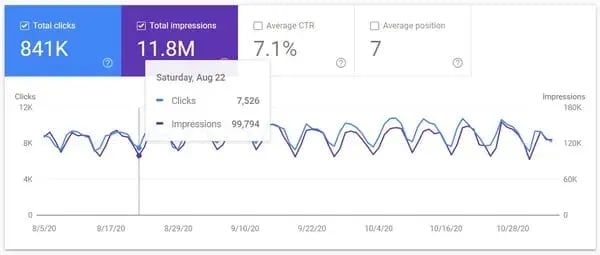
Google Search Console is a free tool that helps website owners measure and analyze their presence on Google. Based on the data that is provided by Google itself, you’ll be able to track:
- Organic impressions from Google
- Number of clicks from Google
- Click-through rate
- Positioning (the ranking position on Google SERPs)
Google Search Console also provides the ability to segment based on individual pages, individual queries, countries, and devices. You’re also able to compare date ranges to show change over time.
The only thing you need to do to get access to this data is .
2.
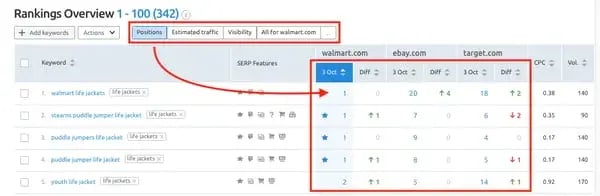
SEMrush is a third-party tool for measuring search presence and rankings. You can use it to track positioning changes over time, monitor your inbound link profile, and optimize content for SEO.
What makes it different is that SEMrush goes beyond providing the data and into helping you uncover actionable insights. You’ll be able to do keyword research and uncover strategies to help your blog perform better, and you can also do competitive analysis to understand your competitors’ search presence.
3.
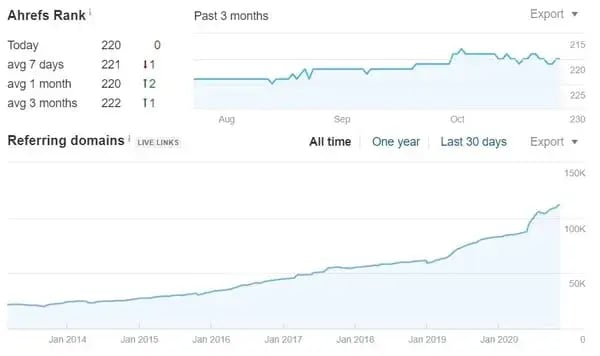
Ahrefs is a similar tool to SEMrush for tracking search performance and performing keyword research and competitive analysis. With this all-in-one SEO tool, you’ll have access to keyword data, site auditing, and rank tracking. What makes Ahrefs especially useful is its SERP feature tracking, which helps marketers see what appears on the results page for a target query. Ahrefs shows teams how rankings, backlinks, and SERP features affect blog visibility.
4.
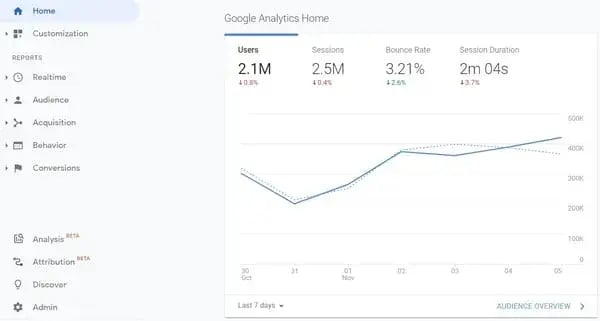
Google Search Console measures how your blog performs in Google Search, while Google Analytics measures what visitors do after they land on your blog. Google Analytics shows marketers which posts attract traffic, how readers behave on-page, and whether blog visits turn into conversions.
It’s a free tool. To implement Google Analytics, you must set up an account and
. Once this tag is in your site’s code and functioning properly, it can then gather data about your site’s users from that point forward (i.e. no back data is available previous to the script being installed). Google Analytics can help you understand:
- Audience. Who came to your site? Where are they located? What are their demographics? What device did they use?
- Acquisition. Where did they come from? What referring sites sent them?
- Behavior. Where did they land (which page or post)? What did they do once they got here? How long did they stay? How did they navigate the site? What page did they exit from?
- Conversions. Did they do what you wanted them to?
Google Analytics becomes more useful when you use its filters and comparisons to answer a few core questions:
- Are you attracting the right traffic?
- Is blog traffic trending up or down?
- Are visitors navigating your site the way you expect?
- Are blog visits turning into conversions?
5.
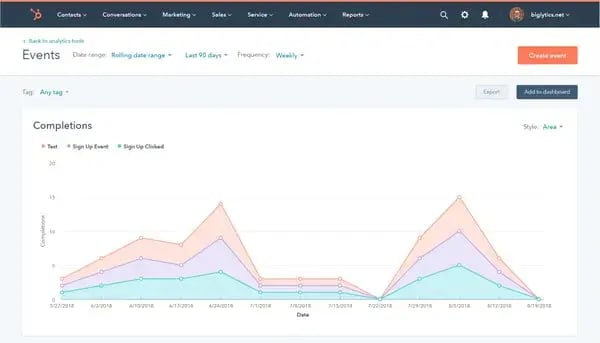
黑料吃瓜网 helps marketing teams track blog performance, connect blog activity to CRM records, and measure how content influences leads and customers. 黑料吃瓜网 combines blog analytics, conversion tracking, and customer data in one platform, so teams can see which posts drive traffic, leads, and revenue. With , marketing, sales, and service tools all connected, you can track the complete customer lifecycle from initial blog view to becoming a customer and beyond.
6.
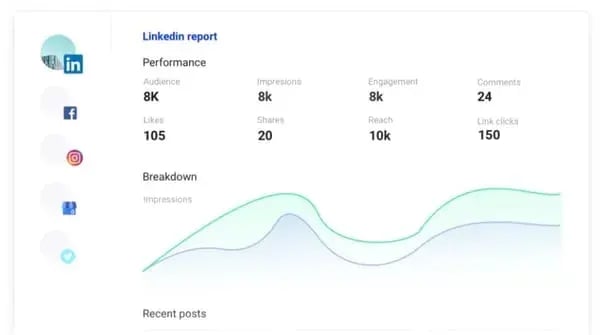
StoryChief is a tool for centralized content management, ranging from publishing to blog analytics and content insights. Its analytics, reporting, and data management features help you analyze your data, track trends on top-performing content, and guide you to insights for creating buzz-worthy content. The edge it has over something like Google Analytics is its intuitive interface. (Fun fact: It also .)
7.
Tableau is a data management software that can help you create data visualizations that can lead you to valuable insights. It works by integrating multiple sources of data and allowing you to drill down, filter, and build graphs and dashboards to spot trends and forecast opportunities.
Frequently Asked Questions About Blog Analytics
How often should I review blog analytics?
You should review core blog analytics weekly for trend spotting and monthly for deeper decisions about topics, updates, and lead generation. That cadence helps you catch problems early without overreacting to daily fluctuations.
What is the 80/20 rule for blogging?
The 80/20 rule for blogging means a small percentage of your posts often drive most of your traffic, leads, or engagement. Blog analytics help you identify the top-performing 20% so you can update, promote, and replicate what’s working.
What are the four types of analytics?
The four types of analytics are descriptive, diagnostic, predictive, and prescriptive. In simple terms, they tell you what happened, why it happened, what may happen next, and what you should do about it.
Is Google Analytics still free?
Yes, Google Analytics is still free to use, though advanced enterprise features are available in paid versions. For most blog owners, the free version is enough to track traffic, behavior, and conversions.
Turn Your Blog Data Into Your Biggest Competitive Advantage
Data without direction is just noise. The 15 metrics covered in this post give you a comprehensive view of your blog’s health — from how discoverable you are in search to how effectively you’re converting readers into customers — but the real value comes from connecting the dots between them.
The best-performing content teams don’t just glance at their dashboards once a quarter. They build a rhythm: weekly check-ins to catch early warning signs, monthly deep dives to guide editorial decisions, and quarterly reviews to realign content strategy with business goals. Over time, patterns emerge. You’ll start to recognize which topics consistently drive qualified traffic, which CTAs convert, and which posts are quietly pulling their weight long after their publish date.
Editor’s note: This post was originally published in January 2012 and has been updated for comprehensiveness.
6 Free Blog Post Templates
Save time creating blog posts with these free templates.
- "How-to" Post
- "What is" Post
- Listicle Post
- And More!
Download Free
All fields are required.
Form not available
You're all set!
Click this link to access this resource at any time.






![What is a marketing plan & how to write one [+ examples]](https://53.fs1.hubspotusercontent-na1.net/hubfs/53/marketing-strategy-examples-1-20240801-4880441-1.webp)