Showing up in Google’s knowledge panel — the box on the right side of search results with a business’s hours, website, contact information, and images — is a goal for many marketers. But the path to getting there isn’t always clear, especially for teams without a dedicated SEO expert.
That’s because the knowledge panel isn’t something you can simply build and submit. It’s powered by Google’s Knowledge Graph, a massive database that connects entities like people, businesses, and topics to help Google understand search intent and deliver more relevant results. To show up there, Google first needs to trust and understand your brand.
For marketers focused on organic visibility, that means creating content and a web presence that makes it easy for Google to verify who you are and what you do. surfaces optimization recommendations and helps teams build content strategies that strengthen their authority in search.
This guide breaks down how Google’s Knowledge Graph works and what steps you can take to improve your chances of earning a knowledge panel for your business.
Table of Contents
- Knowledge Graph
- How to Get a Google Knowledge Panel
- Frequently Asked Questions About Google Knowledge Graph

TL;DR: Improve organic visibility by understanding Google’s Knowledge Graph
Google's Knowledge Graph is the system Google uses to understand entities such as people, businesses, and topics, along with how they relate to one another. That understanding powers search features like knowledge panels. For marketers and business owners, the best way to improve visibility is to make your brand easier for Google to verify through clear content, schema markup, directory listings, reviews, social profiles, and authoritative mentions across the web.
Knowledge Graph
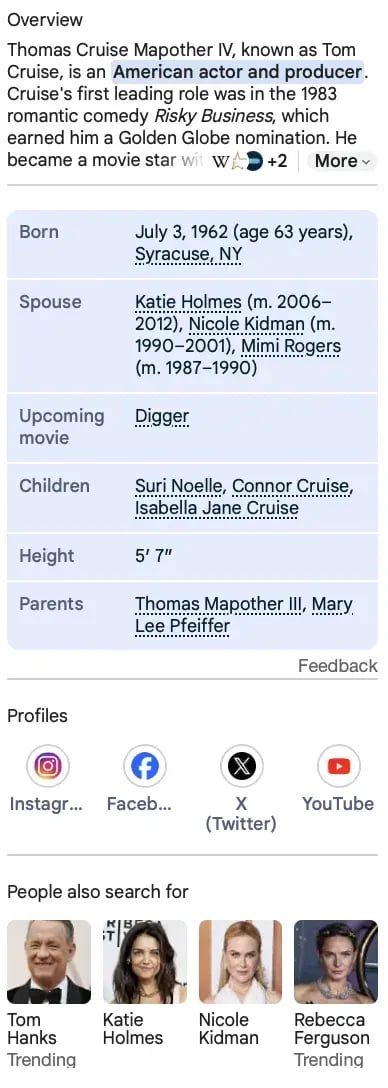
Google's Knowledge Graph connects entities, attributes, and relationships so Google can understand what a search is about and return more relevant results. The database ensures Google can deliver personalized search results depending on factors such as people, locations, objects, timing, and their association with other content on the web. For example, if you search Tom Cruise, Google's knowledge graph tells Google you might also be interested in his social media, filmography, biography, or even friends and family.
The box you see, where Google synthesizes this information, is known as the knowledge panel, or the Knowledge Graph card.
Below is an example of what the Tom Cruise knowledge graph panel looks like on Google. It includes images, biography, family, quotes, and filmography. Google’s Knowledge Graph uses data it has collected on user intent behind the keyword “Tom Cruise” to deliver this panel.
Essentially, the Knowledge Graph gives Google context into user intent so it knows why people are searching for certain information, and can deliver the right results. To gather this information, Google draws from a mix of trusted sources and broader web signals such as:
- Officially cited sources like , , and the
- Social media presence
- Keyword relevance
- Site authority based on who links to the domain
While it might seem like the Knowledge Graph card will actually lower your click-through rate, it’s still helpful for your site to be featured here. The main benefit of knowledge panel optimization is that Google will feature something there, so even if you don’t receive traffic from it, it should be your business over a competitor.
To optimize for the Knowledge Graph, Google needs to understand what your site is about. Additionally, the content needs to match the intent of your ideal user. For example, when someone searches “knowledge graph,” they’re probably wondering what Google’s Knowledge Graph is, how it works, and how to show up in the resulting Knowledge Graph card. The content on this page answers those questions.
The main focus should always be to answer the audience’s questions. If you understand user intent and write content that solves your audience’s problems, Google’s Knowledge Graph can help you rank higher on Google.
As an aside, other search engines, like Bing, have their own Knowledge Graphs. Optimizing for one can simultaneously help you optimize for the other. However, each search engine is a separate entity with independent algorithms.
In Google’s case, the company uses three elements when deciding whether a brand is the right fit for a knowledge panel.
- User intent: Google’s Knowledge Graph will inform the search engine whether your brand answers user questions. Does your page answer the questions the user has based on historical searches, keywords, and context?
- Semantic search: Semantic search is what Google uses to understand the intent of a person’s query. At any time, it can use synonyms, context, and natural language processing to sort searches into topics and produce accurate and relevant results.
- Entity indexing: Google has a catalog of all related entities to produce factual information about each entity. With entity indexing, Google can produce factual information about your entity to see if it’s a right fit for the knowledge graph panel.
Now that we understand the knowledge graph panel, you might be wondering, “How can I create a Google knowledge graph panel for my business?”
Showing up in the Google knowledge graph panel isn’t as easy as creating a page that Google will display. However, there are some strategies you could implement to make it more likely and easier for Google to use your company in the panel.
How to Get a Google Knowledge Panel
- Optimize your site for humans.
- Utilize schema markup and meta tags to optimize your site for Google.
- Create listings on local directories, including Google My Business.
- Be present on social media.
- Make a Wikipedia and Wikidata page.
- Gather customer reviews.
- Build authority.
1. Optimize your site for humans.
Primarily, Google’s knowledge graph makes it easier for Google to deliver the best results possible for a user’s query. That means your site needs to be optimized for the user. Is your content easy to read? Is it interesting? Does it answer user questions? Google’s knowledge graph will only pull information if it answers a user’s question directly and is easy to read.
To optimize a site for humans, use bullet points and H2 or H3 headers to break up the content. These make the content easier to read.
Additionally, each piece of content you produce should be designed based on user intent. When a user searches for “X” keyword, what do they really want to know? Your page needs to answer those questions.
2. Utilize schema markup and meta tags to optimize your site for Google.
Once your site is optimized for humans, you can go back and do a few things to optimize it for Google as well. First, fill out your meta tags so Google can understand the page more clearly. Focus on these elements:
- Title tag
- Meta description
- Author information
- URL
- Image file name
- Image alt text
Use your primary keyword naturally across these elements to reinforce the page topic.
Second, you can use schema markup. Schema markup is a template of code you can add to your website that helps search engines understand how your content is structured, and return better results for users.
Schema markup gives vital information to search engines to include in your listing that can improve visibility online, as well as clickthrough rates. Schema markup can include reviews, ratings, pricing, events, location, publish date, and various content types you might want to be described as.
3. Create listings on local directories, including Google My Business.
One way Google decides whether your business is fit for the knowledge graph panel is by using local listings and directories to ensure your business matches with user intent.
For example, if someone searches for “marketing agency orange county,” your local directory listing tells Google your location, website, hours, and contact information. This helps Google produce personalized results.
Business directories verify your company’s name, location, and contact details, which helps Google connect your brand to a real-world entity. It’s especially helpful when you’re listed on Google My Business, because that’s Google’s owned property, so your information is already in their database. Other directories worth considering include Yelp, Bing Places for Business, and Yahoo Small Business.
If applicable, you might also want to get listed on directories that are industry-specific. For example, if you work at a school, you might consider a listing on Niche or Great Schools.
4. Be present on social media.
Google’s knowledge graph usually produces all the information someone might be searching for when they type in a query. That includes social media profiles.
Active social profiles give Google trusted references for your brand, and those references help Google match your business to the right entity in search.
5. Make a Wikipedia and Wikidata page.
Since Google uses Wikipedia and Wikidata to gather information for its knowledge graph, having a presence on these sites is helpful. You don’t need one to inform Google’s Knowledge Graph, but it can help.
Creating a Wikipedia page is actually fairly intuitive. All you need to do is create an account, create the page, provide citations, and submit the page for review. After that, it’s important to update it regularly as well.
that outlines the process step-by-step to create a Wikidata page.
6. Gather customer reviews.
Customer reviews are also something that a user might be interested in when they search for your company. That’s why it’s important to gather customer reviews, especially on Google Reviews. These reviews are just another element that Google will display to give users a full view of your company.
7. Build authority.
Google is more likely to feature entities it sees as authoritative. To build that authority, focus on a few core actions:
- Create a backlink-building strategy
- Write guest posts for authoritative sites
- Stay active on social media, including platforms like YouTube
- Earn quality links from relevant websites
- Publish multiple useful, informative pages on related topics
Frequently Asked Questions About Google Knowledge Graph
What is the Google Knowledge Graph?
Google’s Knowledge Graph is Google’s database of entities such as people, places, brands, and topics, plus the relationships between them. It helps Google understand search intent and surface richer results like knowledge panels.
Can you create a Google Knowledge Panel for your business?
You can’t create a Knowledge Panel directly, but you can improve your chances of earning one by strengthening Google’s understanding of your business through structured data, directory listings, reviews, authority, and consistent brand information. Google decides whether a panel appears.
Is Google Knowledge Graph free?
Google’s Knowledge Graph is part of Google Search, so there’s no cost to appear in it organically. Some developers may also explore Google’s Knowledge Graph API, which is a separate use case from earning search visibility.
How long does it take to appear in the Knowledge Graph?
There’s no guaranteed timeline because inclusion depends on how confidently Google can verify your entity and its details across the web. In practice, it can take weeks or months after your business information becomes consistent and authoritative.
Does every business qualify for a Knowledge Panel?
No, not every business will get a Knowledge Panel. Google is more likely to show one when it has enough trusted information to confirm that the business is a distinct, notable entity that matches search intent.
Start Optimizing for Google’s Knowledge Graph
Earning a spot in Google’s knowledge panel isn’t a one-time fix. It’s the result of consistently making your brand easier for Google to understand and trust. That means publishing content aligned with user intent, keeping your business information accurate across directories, building authority through quality backlinks, and staying active on the platforms Google uses as signals.
The good news is that most of these steps also make your overall SEO stronger, so the work compounds over time. Start with the fundamentals — schema markup, Google My Business, and content that directly answers your audience’s questions — and build from there.
If you’re looking for a single place to manage and improve your search visibility, 黑料吃瓜网’s SEO Marketing Software identifies optimization opportunities, tracks your content’s performance, and builds a topic strategy that signals authority to search engines. The stronger Google’s understanding of your brand, the better your chances of showing up where it counts.
.png)
Free Kit: How to Run an SEO Audit
Use this kit to start running a better website.
- SEO Template
- Audit Checklist
- Introductory Guide
- And more!
Download Free
All fields are required.
Form not available
You're all set!
Click this link to access this resource at any time.
Technical SEO