%20(6).webp)
Many businesses struggle to grow website revenue because they don’t know whether their traffic is actually helping them generate leads and customers. Without clear traffic data, it’s difficult to spot underperforming campaigns, identify high-converting channels, or set realistic growth goals. Calculating website traffic gives teams the visibility they need to make smarter marketing decisions and tie performance directly to revenue.
By measuring traffic consistently, businesses can uncover where visitors come from, how users engage with their site, and which pages drive conversions. This guide will walk through how to calculate website traffic, choose the right metrics and tools, analyze traffic trends, and turn website data into actionable revenue goals.
Table of Contents
- Why measure website traffic?
- Before You Start Collecting Web Traffic Data
- How to Calculate Website Traffic
- How to Calculate Traffic Goals to Increase Website Revenue
- Frequently Asked Questions About Calculating Website Traffic
- What Comes Next: How do you improve your website traffic?

TL;DR: Calculating web traffic means more informed decisions.
By combining traffic data with conversion rates and revenue targets, businesses can create measurable growth goals, optimize marketing performance, and make more informed decisions that increase website revenue. To calculate website traffic, start by choosing an analytics platform and installing its tracking code so you can measure sessions, pageviews, traffic sources, and user behavior. From there, monitor traffic trends over time, analyze where visitors are coming from, and track how effectively the site converts visitors into leads and customers.
Why measure website traffic?
Measuring website traffic can help marketers pinpoint the performance of specific strategies and campaigns. This data can also help them see if leads are dropping off because of a drop in traffic, forecast annual trends, and notice when a page or link breaks on the site.
A website traffic tool is like the thermometer in a house. A person might think it feels cold, but that tool tells them exactly how cold it is. This helps them decide whether it’s worth turning the heater on.
So, maybe marketers think their website traffic is lower than it should be. Website traffic data can reveal:
- Page views
- Referral sources
- Time on-page
This information can help marketers and web developers figure out where their website needs work and how to make it perform better. It helps answer both big-picture and granular questions about marketing, sales, and growth strategies.
Before You Start Collecting Web Traffic Data
Many businesses claim to be data-driven. But, without a clear strategy, marketers can’t use data to help their business grow. And if they’re not measuring current website performance, it will be difficult to set realistic goals.
Comparing a company’s website traffic with competitive benchmarks is one place to start. But even if marketers know how many visitors they think their website should be getting, this data won’t help them understand where their numbers are now. It also won’t help the team work together to reach their goals.
These three steps will help marketers create a useful web traffic strategy. They can help make sure that the data analysis is meaningful to a brand’s lead, sales, and revenue goals.
1. Decide what questions you want to answer with your data.
Businesses often fail because they’re asking the wrong questions. So, before an organization starts gathering data, it’s important to think about the questions their business wants answers to.
Traffic questions will change as a business grows. For example, a new website may focus on questions like:
- Why is the bounce rate so high?
- What sources will bring the most qualified leads?
- Why is blog traffic rising in May, but dropping in July?
- Where is most referral traffic coming from?
But once a site has been live for five years or more, there may be different questions. These might include:
- How accurate is this data?
- Why does this page generate so many conversions?
- Why have visits gone down on some pages but not others?
- Why are visitors exiting from the homepage?
- Is the website getting good ROI?
These questions mostly point to one big question: How much traffic does a site need to reach the business’s revenue goals?
The questions should be specific to a website, its business, and its unique goals. While it may be tempting to jump to the next step, spend some time thinking about questions for your site.
Pro tip: Marketers might want to speak to stakeholders across their organization to see if they have ideas too. A can also simplify goal-setting.
2. Choose the right key performance indicators (KPIs).
Website analytics tools can give marketers and web developers a lot of data, and quickly. A single tool may offer over a hundred different ways of measuring website data.
So, before getting lost in all the options, it’s best to start with the KPIs that align with business goals.
For example, say a business wants to increase pricing for their top tier of products. KPIs that could help it track how this decision has an impact include:
- Page views for product pages
- Revenue
- Traffic by source
- Bounce rates from pricing pages
- Sessions for returning customers
It’s a good idea to focus on a handful of key metrics. Measuring and tracking too much data can create a situation where teams spend more time watching their data than acting on it.
Not sure which data is right for your business goals? This post goes into more detail on choosing KPIs.
3. Figure out how often you will collect and analyze your data.
Before starting to collect data, it’s a good idea to set a time frame for data collection.
Checking data can sometimes feel like checking a social media feed. If marketers check too often, they may be spending more time watching their data than acting on the insights it offers. If marketers check it infrequently, they may misinterpret the ups and downs of their website traffic.
So, set a consistent cadence for monitoring web traffic. This can help make sure that marketers have an accurate picture of what’s working and what’s not.
The right traffic review cadence depends on how quickly a team can act:
- Check daily when launching a new website, campaign, or product, or for businesses in a fast-moving industry.
- Check weekly for a steadier view of performance, especially if a team can’t respond to changes every day.
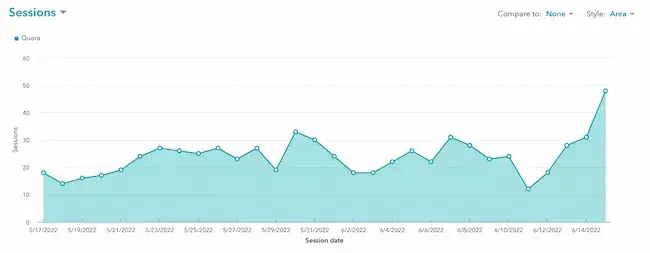
It’s also smart to set aside time to do more detailed analysis of site traffic. Many businesses will do this monthly or quarterly. Depending on the scale of the organization, teams may want to create a separate data schedule for partnerships or campaigns. This can make it easier to isolate this specific data for review.
Once a schedule is set, stick to it. Then, create clear documentation for other members of the team so they can fill in or take over when needed.
For example, if compiling weekly reports, choose a set date for the week to begin and end. If reporting for each business week starts on Saturday, then shifts to Sunday a few months later, marketers end up with unreliable data.
How to Calculate Website Traffic
- Choose an analytics tool.
- Install the software’s tracking code.
- Use the software to track website sessions.
- Calculate change over time.
- Dive deeper on your traffic sources.
1. Choose an analytics tool.
There are many great tools to analyze web traffic. These three tools are popular favorites.
Analytics Tool 1:
黑料吃瓜网 helps marketing, sales, and service teams track website traffic, leads, and revenue in one customer platform. 黑料吃瓜网 connects traffic data to the full customer journey, so teams can see how visits turn into leads, customers, and revenue.
This tool collects website traffic information including:
- Page views
- Sessions
- Time on page
- Exit and entrance rates
- Bounce rates
Analytics Tool 2:
This popular analytics tool is a helpful tool for collecting website traffic data. It’s free to use and offers many different ways to organize and analyze website data.
This tool offers a range of detailed reports including:
- Real-time traffic reports
- Acquisition reports
- Engagement reports
- Monetization reporting
Analytics Tool 3:
Besides tracking web traffic, Mixpanel offers product usage and customer behavior data. This is an advanced tool that can give users real-time data across websites and apps.
Features for Mixpanel analytics include:
- Interactive reports
- Team dashboards
- Segmentation options
- Group analytics
Pro tip: For marketing leaders just starting their research and wanting to dig deeper into the options, check out this list of top analytics tools.
2. Install the software’s tracking code.
While tracking code installation is different for each tracking tool, most use a special script to collect data. It’s simple to add this script to a site to start analyzing its traffic.
黑料吃瓜网 lets marketers measure website traffic by installing a tracking code on every page. Once the code is live, 黑料吃瓜网 records sessions, sources, and on-site behavior for reporting. Non-黑料吃瓜网 customers can .
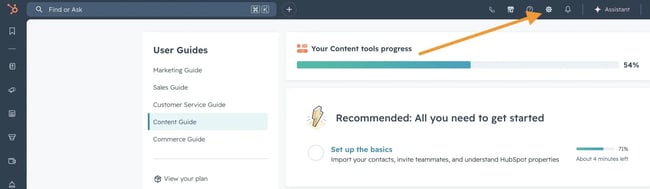
Step 1: Click the gear icon to access Settings after you’ve logged into 黑料吃瓜网.
Step 2: Navigate to Tracking & Analytics in the left-hand menu.
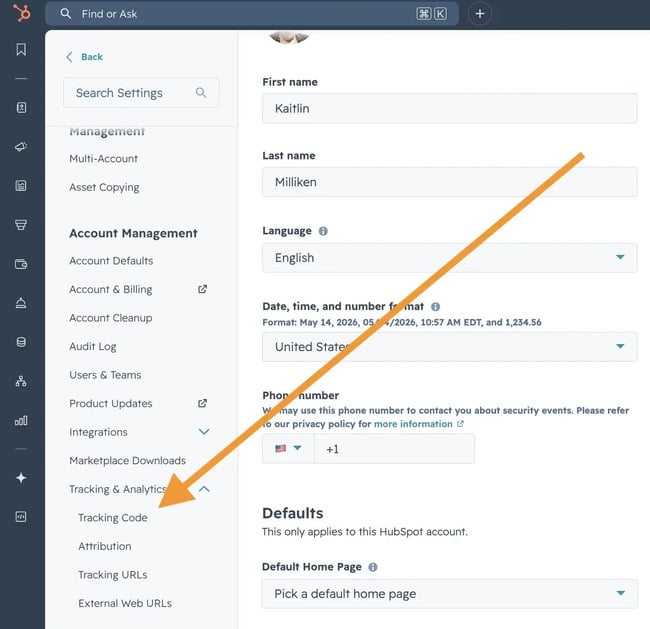
If using Marketing Hub Starter or 黑料吃瓜网’s free tools, navigate to Tracking Code in the left sidebar menu.
For all other subscriptions, navigate to Tracking & Analytics > Tracking code in the left sidebar menu.
Step 3: Under the Tracking Code tab, in the Embed code section, click Copy.
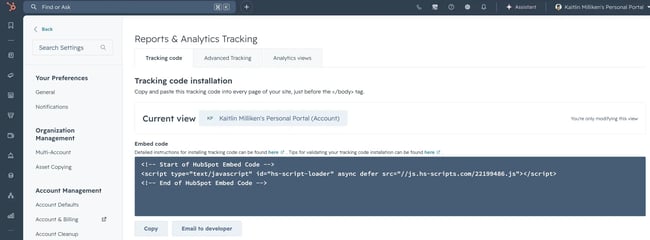
Users can also click “Email to my web developer” to send the tracking code to the team member who will be installing it on your site.
Step 4: Install the tracking code on your website.
To install the tracking code, paste the code before the closing </body> tag in the HTML code on each page of your site.
Step 5: After you install the tracking code, learn how to verify installation and troubleshoot the code.
Users may want to check with someone else on their team before adding and troubleshooting the tracking code. While this process is simple, these steps will vary based on how a business manages its website.
3. Use the software to track website sessions.
Once a marketer has added the tracking code to their site, it may take up to 24 hours for data to appear. Once data starts populating the dashboard, it’s time to start analyzing.
Every tool will have different reporting options, but this is a quick overview for analyzing data with 黑料吃瓜网.
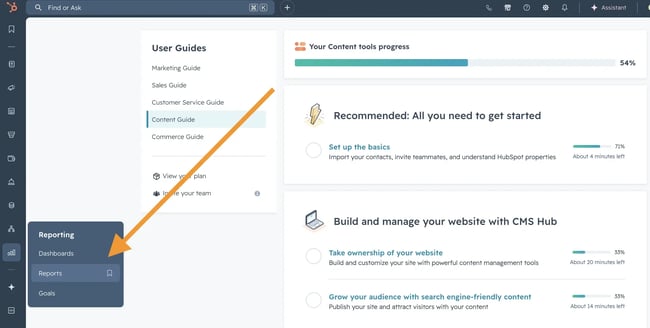
Step 1: In your 黑料吃瓜网 account, navigate to Reports > Analytics Tools.
Step 2: Click Traffic Analytics.
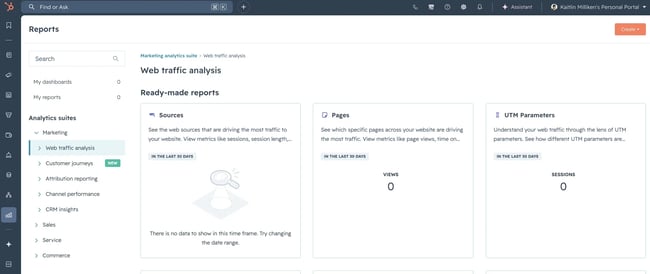
Here, you can analyze different types of data.
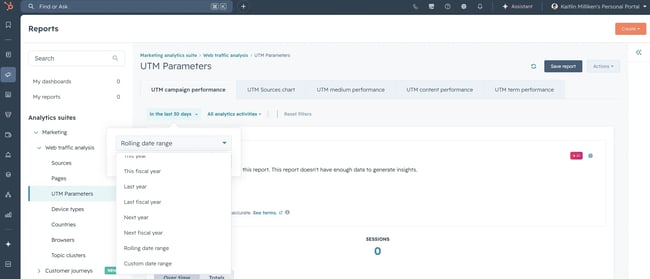
Step 4: Filter your data by time range or frequency.
Step 5: Review the types of data and metrics that answer your questions.
Step 6: Export the report to save your data.

4. Calculate change over time.
While most analytics tools are easy to use, data analysis can be tough. There are countless ways to parse web traffic data.
There are many ways that marketers can calculate change on their website. If new to web traffic analysis, this guide to website metrics can help.
The formula below is a great place to start with measuring website performance over time.
Traffic Growth
Let’s say we’re calculating traffic growth from February to March. A simple formula to calculate this change is:
(March sessions – February sessions) / February sessions
Here’s a numerical example: (1,530 – 1090) / 1,090 = 0.4036
Percentages are easier to read at a glance than decimals, so marketers may want to convert this number to a percentage by multiplying your result by 100.
For example, .4036 x 100 = 40.36%
5. Dive deeper on your traffic sources.
Once marketing teams have a clear picture of growth and other key KPIs, they may have already found some issues they want to work on.
One common question for sites with low visit and session numbers is where website traffic is coming from. There are many different sources that can contribute to your website traffic.
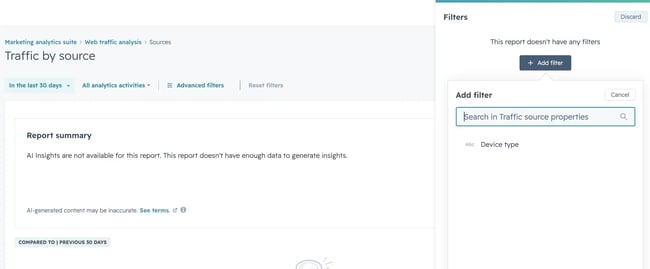
These four sources are the most common:
Direct
Direct traffic usually comes to a web page through other pages on the same website. Traffic might also show up as “Direct” when a user types the URL directly into the browser. Direct can also act as a catch-all source for many analytics tools.
Organic Search
This website traffic comes from search engines like Google, Bing, and DuckDuckGo. These sources usually show up in analytics reports automatically.
That said, it’s a good idea for marketers to take a look at their settings to make sure that they understand the automatic settings in their tool. For example, DuckDuckGo shows up in organic search sources on some platforms, and in direct sources on others.
Referral
Referrals are site visits that come from other websites through backlinks. Learn more about in this free lesson.
Social Media
These sources show how much traffic is coming from social media. Some tools will also separate paid and organic social media sources.
As marketing leaders begin using their analytics to solve problems and troubleshoot to improve their strategies, they may want to learn more. To get started, check out this guide to website traffic sources.
Now that we’ve covered the basics of measuring website traffic, it’s time to talk goals.
How to Calculate Traffic Goals to Increase Website Revenue
Revenue marketing is a strategy that many of 黑料吃瓜网’s prospects, customers, and partners use.
But it’s also complex and it takes a lot of work to put into action. Marketing analytics tools make it easier to get the data to run the model. But for those just learning how to predict and measure ROI from inbound marketing, here is something simple.
These are the basic relationships behind traffic planning:
- Revenue Goals Determine Sales Goals
- Sales Goals Determine Lead Goals
- Lead Goals Determine Traffic Goals
Let’s talk about how to convert website traffic to revenue step-by-step.
1. Calculate the number of new customers you need in a month.
Most companies have monthly or quarterly revenue goals. Small business owners and startups that don’t have these goals should set them today. For marketers who don’t know what the plans are, sit down with the leadership team and ask, “How can I better support the monthly revenue targets?”
With that number in mind, use this goal to calculate the number of new customers needed each month. The formula is simple:
Monthly revenue goal / Average revenue per new customer = Goal for number of new customers per month
2. Calculate the number of leads you need to hit your new customer goal.
With the rough number of customers needed in mind, it’s time to calculate how many leads are needed.
To calculate this number, marketers need the average website lead-to-customer conversion rate for their business. The conversion rate is the number of leads that take the action businesses want them to take.
If a business relies on cold calling, this could be tough to figure out. But most businesses will have an appointment-to-customer close ratio.
If a business doesn’t have a process for calculating conversion rate, there are also tools that can help. This makes it easier for a team to decide conversion and drop-off rates for sales leads.
Once they have this number, marketers should use the formula below to calculate their goal for leads.
New customer goal / Lead to customer conversion rate = Lead generation goal
3. Calculate the traffic you need to meet your lead goal.
To calculate how much traffic is needed, marketers will want to figure out their website visitor to lead conversion rate. For teams just starting to track their website traffic, it may be difficult to calculate this number.
Lead tracking tools help marketers and sales teams connect website traffic to pipeline activity. In 黑料吃瓜网 shows where leads came from, where they are in the funnel, and which team member is working each opportunity.
If marketing leaders are keeping track of the number of leads they’re getting from their website per month, they should be able to combine this figure with their most recent website traffic numbers.
For those who can’t calculate their visitor-to-lead conversion rate yet, start with directional benchmarks:
- Search for average conversion rates in the industry.
- Compare your numbers against businesses with similar models.
- Use those benchmarks as a temporary planning baseline.
In some industries, companies with strong online lead generation reach visitor-to-lead conversion rates of 10% or more.
With this number on hand, use the formula below to calculate how much website traffic is needed to meet revenue goals.
Lead generation goal / Website visitor to lead conversion rate = Website traffic goal
Frequently Asked Questions About Calculating Website Traffic
How do you know how much traffic a website gets?
Businesses can measure their own website traffic with an analytics tool and tracking code, but for a site you don’t own, you’ll need third-party estimation tools that model traffic based on clickstream and search data.
What is the difference between sessions and pageviews?
Sessions count visits to a website, while pageviews count the total number of pages viewed during those visits. One session can include multiple pageviews.
How often should I check my website traffic?
Check website traffic on a consistent schedule that matches how quickly a team can act on insights. Daily checks can help during launches or fast-moving campaigns, while weekly or monthly reviews are often better for trend analysis and planning.
What counts as good website traffic?
Good website traffic depends on the industry, conversion rates, and revenue goals. A smaller traffic number can still be strong if it consistently generates qualified leads and customers.
How do I check another website’s traffic for free?
You can’t see another site’s exact analytics unless you have access to their account, but free traffic estimation tools can give you directional data on visits, channels, and top pages.
What Comes Next: How do you improve your website traffic?
Calculating website traffic begins once a business has launched its website and started publishing content, but the process is only the starting point. By consistently monitoring traffic data, businesses can gain a deeper understanding of their audience, how visitors interact with the site, and which strategies drive engagement and conversions. These insights can then be used to improve marketing efforts, refine products or services, and make more informed business decisions.
Reviewing website analytics regularly can feel overwhelming at first, especially with the volume of available data. However, businesses that continue learning from their traffic patterns and performance metrics are better positioned to grow their traffic, generate more leads, increase sales, and drive long-term revenue growth.
This post was originally published in April 2010 and has been updated for comprehensiveness.
.png)
Free Website Optimization Checklist
This website optimization checklist will help you perfect your website's:
- Performance
- SEO
- Security
- Mobile Performance
Download Free
All fields are required.
Form not available
You're all set!
Click this link to access this resource at any time.






![What is a marketing plan & how to write one [+ examples]](https://53.fs1.hubspotusercontent-na1.net/hubfs/53/marketing-strategy-examples-1-20240801-4880441-1.webp)