

Instagram SEO is the difference between posting content and being found for it. Even today’s best and brightest marketers know it. According to , 41% of marketers say the top trend they're exploring is updating their SEO strategy to account for changes in search.
That said, once you understand how the Instagram algorithm works, the steps to improve your reach are concrete and repeatable. That said, Instagram’s algorithm isn’t one system; it’s a set of ranking models that decide what surfaces in Search, Explore, Reels, and suggested feeds based on signals you can directly influence.
This article breaks down 8 techniques that target those signals, from profile-level keyword strategy to content metadata and engagement patterns. Each one is something you can implement today with free Instagram marketing tools or the platforms you’re likely already using.
Let’s get into the good stuff, shall we?
Table of Contents:
- What is Instagram optimization?
- How to track Instagram SEO performance with analytics
- How to optimize your Instagram profile for SEO
- Frequently asked questions (FAQs) about Instagram optimization
- Optimize your Instagram for SEO, optimize your social media marketing strategy
What is Instagram optimization?
Instagram optimization is the practice of strategically refining your:
- Profile
- Content
- Engagement patterns
This is done so that Instagram’s search and recommendation systems surface your account to the right audiences.
Essentially, think of it as SEO on Instagram. You’re applying the same discovery-first mindset you’d use on Google, but tailored to how people find content inside the app.
How does Instagram SEO work?
Instagram search works through a combination of signals that determine what appears in:
.png)
Free Instagram for Business Kit
Learn how to get followers, build your audience, navigate algorithm updates, and measure success.
- Best Practices Guide
- Instagram Templates
- Expert Tips
- And More!
Download Free
All fields are required.
Form not available
You're all set!
Click this link to access this resource at any time.
- Search & Explore
- The Reels tab
- Suggested content feeds
Basically, when a user types a query into Instagram’s search bar, the platform evaluates:
- Text match (keywords in your username, handle, bio, and captions)
- Relevance signals (how closely your content aligns with the searcher’s interests and past behavior)
- Popularity signals (engagement velocity, follower count, and share rate)
Instagram’s system also indexes alt text, hashtags, and location tags as discovery metadata, meaning every element of your profile and posts functions as a searchable entry point.
This is exactly why Instagram profile optimization matters so much. Your profile is the single highest-leverage surface for discovery because it’s indexed across multiple search dimensions simultaneously.
More specifically, a well-optimized Instagram profile will:
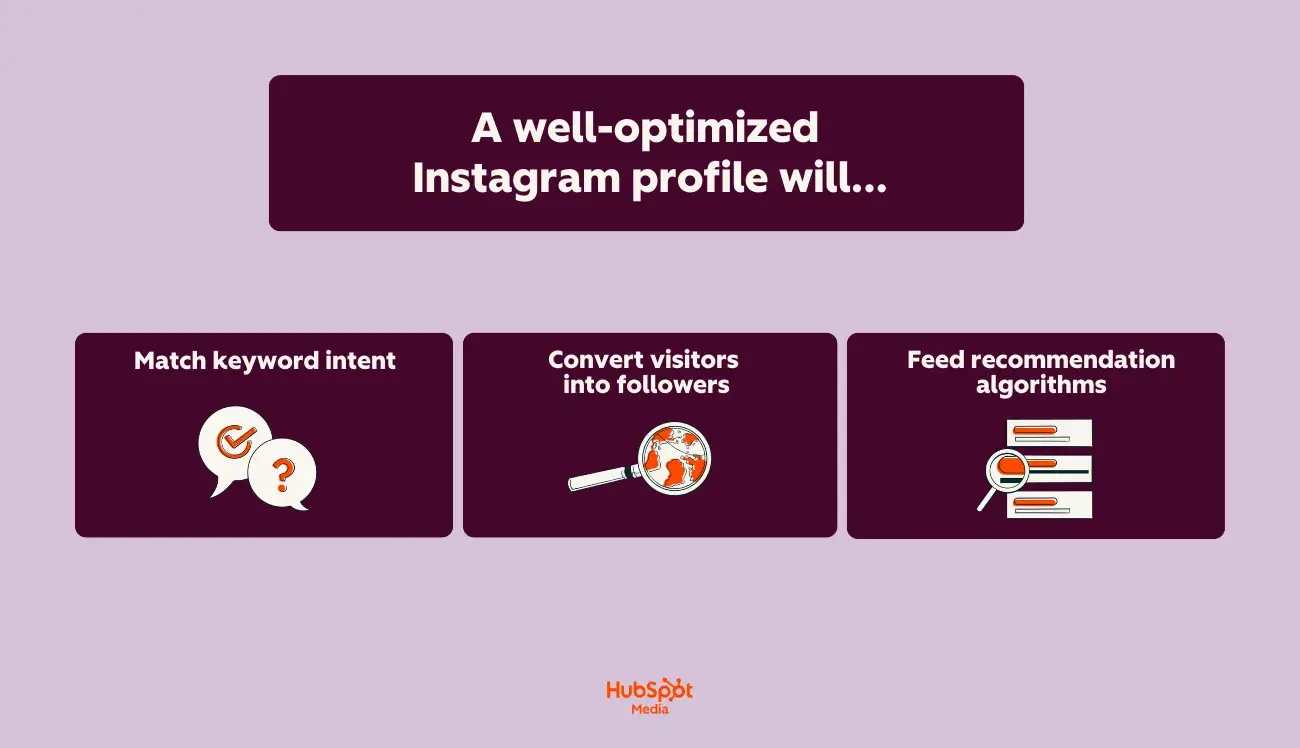
- Match keyword intent. Your display name and bio are weighted fields in Instagram’s search index. Including descriptive, search-aligned language (not just your brand name) helps Instagram understand what your account is about and when to surface it.
- Convert visitors into followers. Discovery without conversion is wasted reach. A clear value proposition in your bio, a cohesive grid, and a strong profile image reduce the friction between “I found this account” and “I’m going to follow it.”
- Feed recommendation algorithms. Instagram’s systems use your profile category, content history, and engagement patterns to determine which Explore pages and suggested feeds you appear in. A disjointed or incomplete profile gives the algorithm less to work with.
Why does Instagram SEO matter?
Understanding how to optimize your Instagram profile is foundational because it compounds over time. Every piece of content you publish inherits the topical authority your profile has built, which means a well-optimized profile amplifies the reach of every post, Reel, and Story you create.
The bottom line: Instagram SEO isn’t a one-time setup task. It’s an ongoing alignment between how your audience searches, how Instagram indexes, and how consistently your profile and content reinforce the same topical signals.
If you’re a visual person (like me), below is a table that breaks down how your Instagram profile should look before and after optimization. (For some context, I used a faux skincare account to help demonstrate the ways in which a profile could be altered for maximum discoverability.)
Take a look:
Now that I’ve covered what optimization looks like in practice, let’s get into the nitty-gritty: how to track your performance with the right analytics.
Pro Tip: For teams managing Instagram account optimization alongside other channels, consolidates this work by letting you publish, monitor, and measure Instagram performance from one platform. Plus, its is especially useful here; it pulls comments, DMs, and mentions into a single stream so engagement signals (which directly influence how Instagram ranks your content) don’t slip through the cracks.
How to track Instagram SEO performance with analytics
Instagram SEO only works if you can measure it. The difference between guessing and optimizing is tracking the specific metrics that reflect how Instagram’s search and recommendation systems are responding to your profile and content changes.
Key metrics that measure Instagram SEO performance
I hate to get all metrics-y. However, for the purposes of this section, I’m going to get all metrics-y. Bear with me.
Not every Instagram metric matters for SEO. However, the ones that do? They directly reflect whether your Instagram optimization efforts are improving discoverability.
Check out the full list of the most important Instagram SEO metrics below:
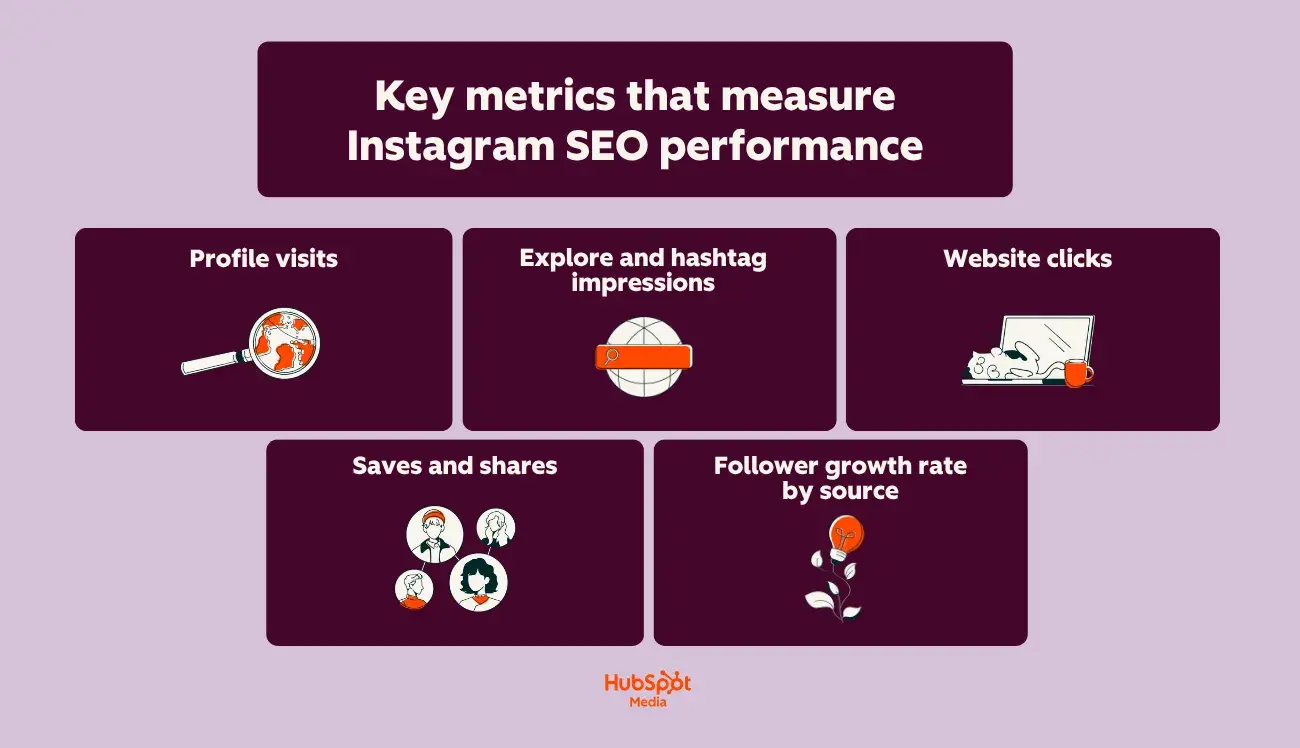
- Profile visits. This is your top-of-funnel SEO metric. A rising profile visit count means more people are finding you through search, Explore, or suggested content — all algorithm-driven surfaces. Track this weekly to measure how changes to your display name, bio, and category affect discovery.
- Explore and hashtag impressions. Instagram Insights breaks down impressions by source: Home, Explore, Hashtags, and Other. The Explore and Hashtags numbers specifically tell you how much of your reach is coming from Instagram's recommendation and search systems rather than your existing follower base. If these numbers are flat or declining, your content metadata needs work.
- Website clicks. This metric tracks how many users tap your bio link. It’s a direct indicator of whether your Instagram profile optimization is converting discovery into action. A high profile visit count paired with low website clicks signals a bio or CTA problem.
- Saves and shares. Instagram weighs saves and shares more heavily than likes as ranking signals. A post with a high save rate signals to the algorithm that the content has lasting value, which increases its distribution across Explore and suggested feeds. Track your save-to-impression ratio as a content quality signal.
- Follower growth rate by source. Instagram doesn’t break follower growth by source natively, but you can infer it by correlating spikes in follows with spikes in Explore or search impressions on specific posts. This helps you identify which content formats and topics are driving SEO-sourced growth.
In the next section, I’ll walk you through how to access Instagram Insights, so you can put real numbers behind your optimization efforts.
How to access Instagram Insights (a step-by-step guide)
Instagram Insights is available for free on Professional accounts (Business or Creator). Here’s what you’ll do to access it (with as our example!):
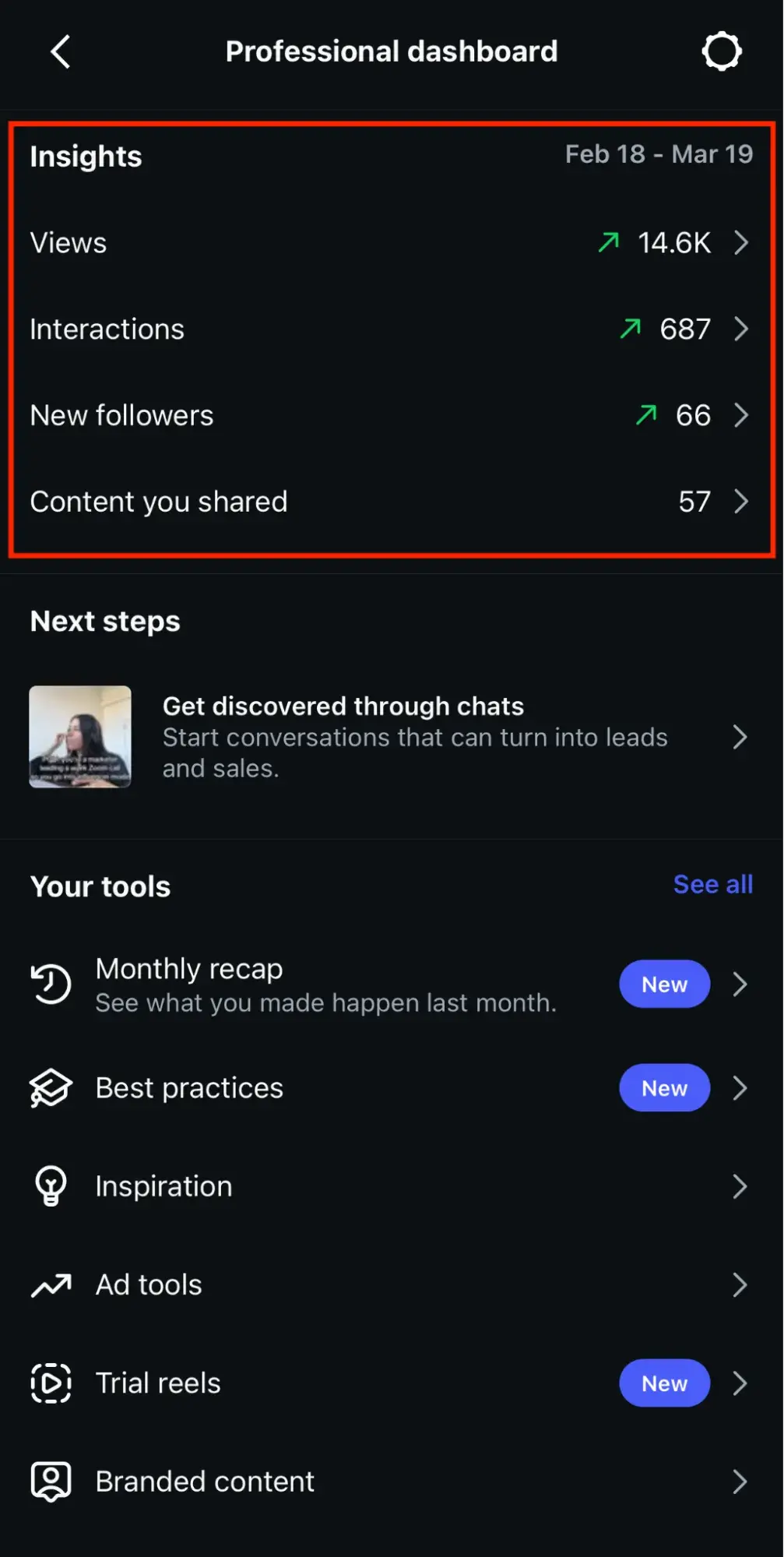
1. To access it, tap the menu icon on your profile and select “Professional Dashboard.”
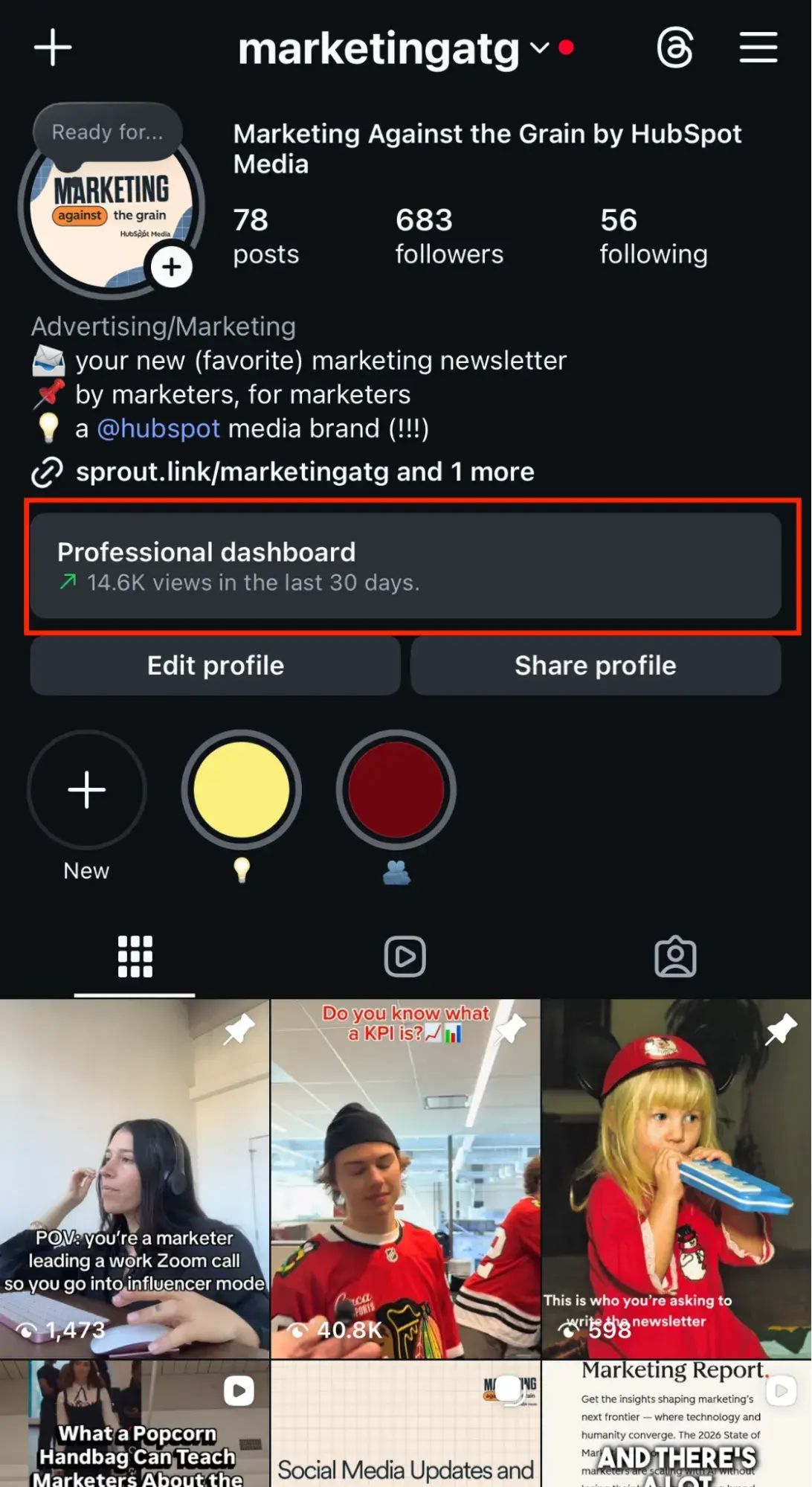
2. From there, you can view data across three tabs: Views (how many times your profile and content were seen), Interactions (likes, comments, shares, and saves across your posts), New Followers (growth trends and audience demographics), and Content You Shared (performance by individual post, Story, Reel, and Live).
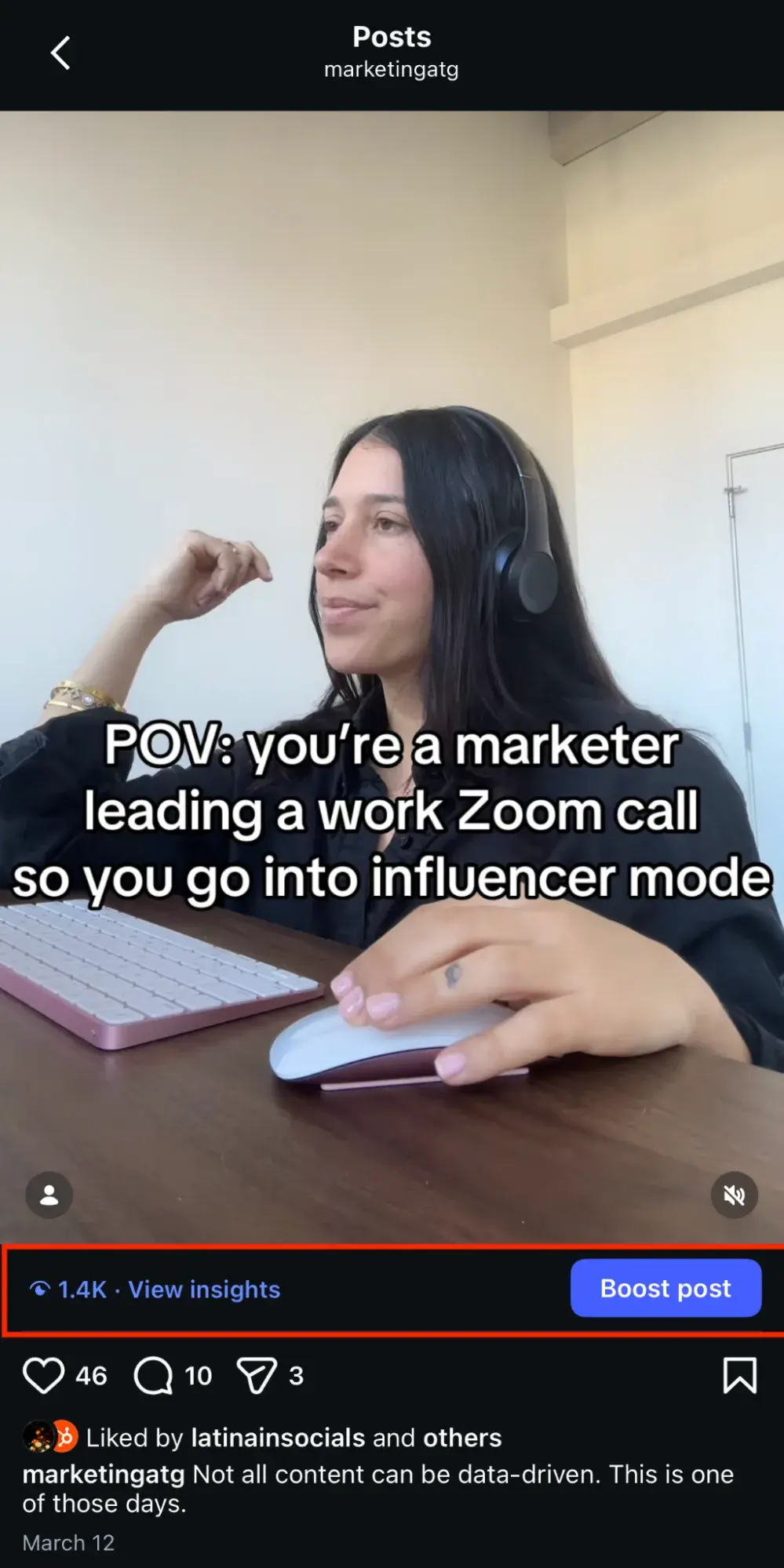
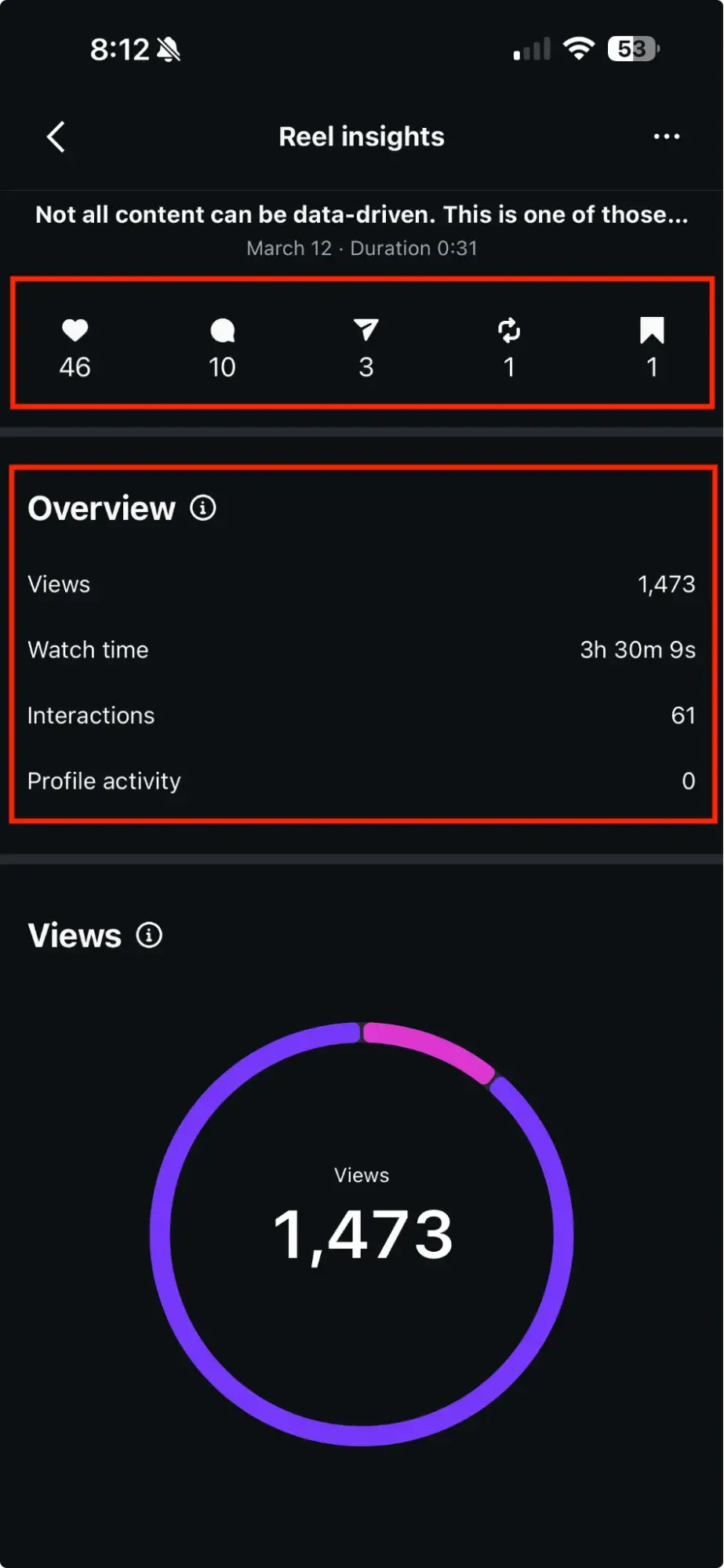
3. For post-level impression source data, tap any individual post, then tap “View Insights” to see the breakdown by Likes, Comments, Sends, Reposts, Saves, Views, Retention, and Overall Interactions.
How to measure and record SEO success over time
If one thing is true about Instagram SEO, it’s this: checking Insights once isn’t a strategy.
To understand whether your Instagram account optimization is actually compounding, you need a consistent tracking cadence.
Here’s how you’ll do it:
- Build a weekly tracking baseline. Record profile visits, Explore impressions, hashtag impressions, website clicks, and follower count every week in a spreadsheet. This creates the trendline you need to isolate what’s working from normal fluctuation.
- Tag content by SEO variable. When you test a new keyword in your bio, change your profile category, or shift your hashtag strategy, log the date and the specific change. This lets you correlate metric shifts to the exact optimization you made rather than attributing results to the wrong variable.
- Track impression source ratios, not just totals. Total impressions can rise because you posted more often. The ratio of Explore + Hashtag impressions to total impressions tells you whether your algorithmic discoverability is actually improving. (TLDR: A growing ratio means Instagram is surfacing your content to people who don’t already follow you.)
- Set a monthly review cadence. Compare month-over-month changes in non-follower reach, profile visits, and saves. These are the three numbers that most directly reflect whether Instagram's systems are indexing and recommending your content more aggressively.
In the following section, let’s examine some practical ways to optimize your Instagram profile for SEO.
How to optimize your Instagram profile for SEO
I’ve told you all about why optimizing your Instagram profile for SEO is important. Now, it’s time to show you how to do it. Below, I’ve outlined a step-by-step guide for turning your profile into a search-optimized discovery engine.
Take a look:
1. Optimize your Instagram profile.
The first step toward increasing your Instagram reach? Effectively optimizing your profile.
You see, driving traffic to your Instagram account won’t benefit you in the long run if your profile isn’t optimized for the best user experience.
Here are a few tricks for optimizing your Instagram profile:
- Make your profile public. A private account is invisible to Instagram’s search and recommendation systems. If your goal is discoverability, this is non-negotiable.
- Choose a colorful, on-brand profile image. Your profile photo is the first visual cue users use when deciding whether to tap your account from search results. High contrast and brand consistency increase tap-through rates.
- Create a recognizable and searchable @username. Your @username is a primary indexed field in Instagram’s search engine. It should be short, easy to spell, and include your core keyword when possible.
- Create an easily searchable business name. Your display name (the bold text below your handle) is separately indexed from your @username, meaning you have two keyword-eligible fields, not one. (More on this in step two.)
- Register for an Instagram Business or Creator account. This is a critical step for Instagram account optimization. Professional accounts unlock Instagram Insights (impression source data, audience demographics, and content performance), the ability to select a profile category (which Instagram uses as a ranking signal), contact buttons, and eligibility for Instagram Shopping and boosted posts.
- Include a trackable link in your bio. Use a UTM-tagged URL pointing to your highest-priority conversion page rather than a generic link-in-bio aggregator. This lets you measure exactly how much traffic your Instagram profile drives and which audience segments are clicking through.
These pointers might seem like a no-brainer, but my experience as a social-media-savvy Gen Z marketing girly has taught me that it’s critical to lay the groundwork before you make any other SEO changes. Once you’ve covered these basics, you can move on to more technical optimizations.
2. Have a primary keyword.
Your display name and @username are the two most important places to put your primary keyword. When users type their intention into the search bar, you’ll match, bringing you closer to that coveted top-of-search position.
To start, you’ll need to pinpoint your primary keyword. We’ll use a bakery as our example. When an Instagram user is looking to fill their news feed with baked goods, they’ll likely search the keyword “bakery.”
When you have this keyword in your display name and @Username, you’re more likely to appear in the suggested accounts search results.
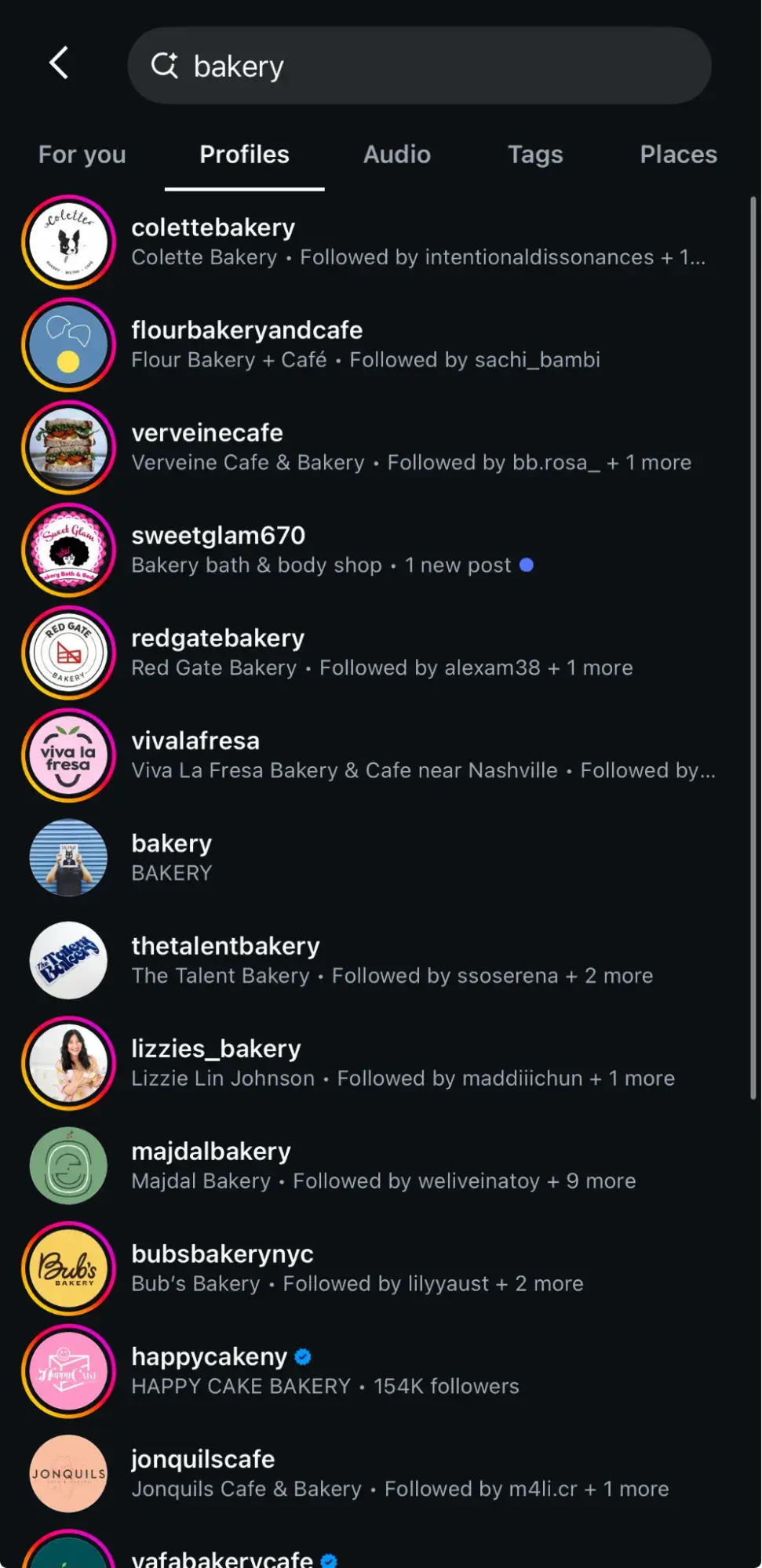
As you can see here, four of the top five search results for bakery have that keyword in both their display name and @Username.
Pro Tip: To get the most out of your optimization, you should use your primary keyword in both places to increase your chances of being picked up by the algorithm. This may be heartbreaking if you were excited about what you’d chosen when opening your account, but the change is a smart move toward optimization, and ultimately your own success!
3. Include a secondary keyword.
Alright. You’ve taken care of your primary keyword. Next, let’s discuss how to get the most out of your secondary keywords. Secondary keywords are the phrases and topics that orbit your primary keyword.
If your primary keyword is “bakery,” your secondary keywords might be “cupcakes,” “wedding cakes,” “baked goods,” etc.
As an example, let’s take a look at Levain Bakery. Their primary keyword is outlined in red, and their secondary keywords are outlined in orange:
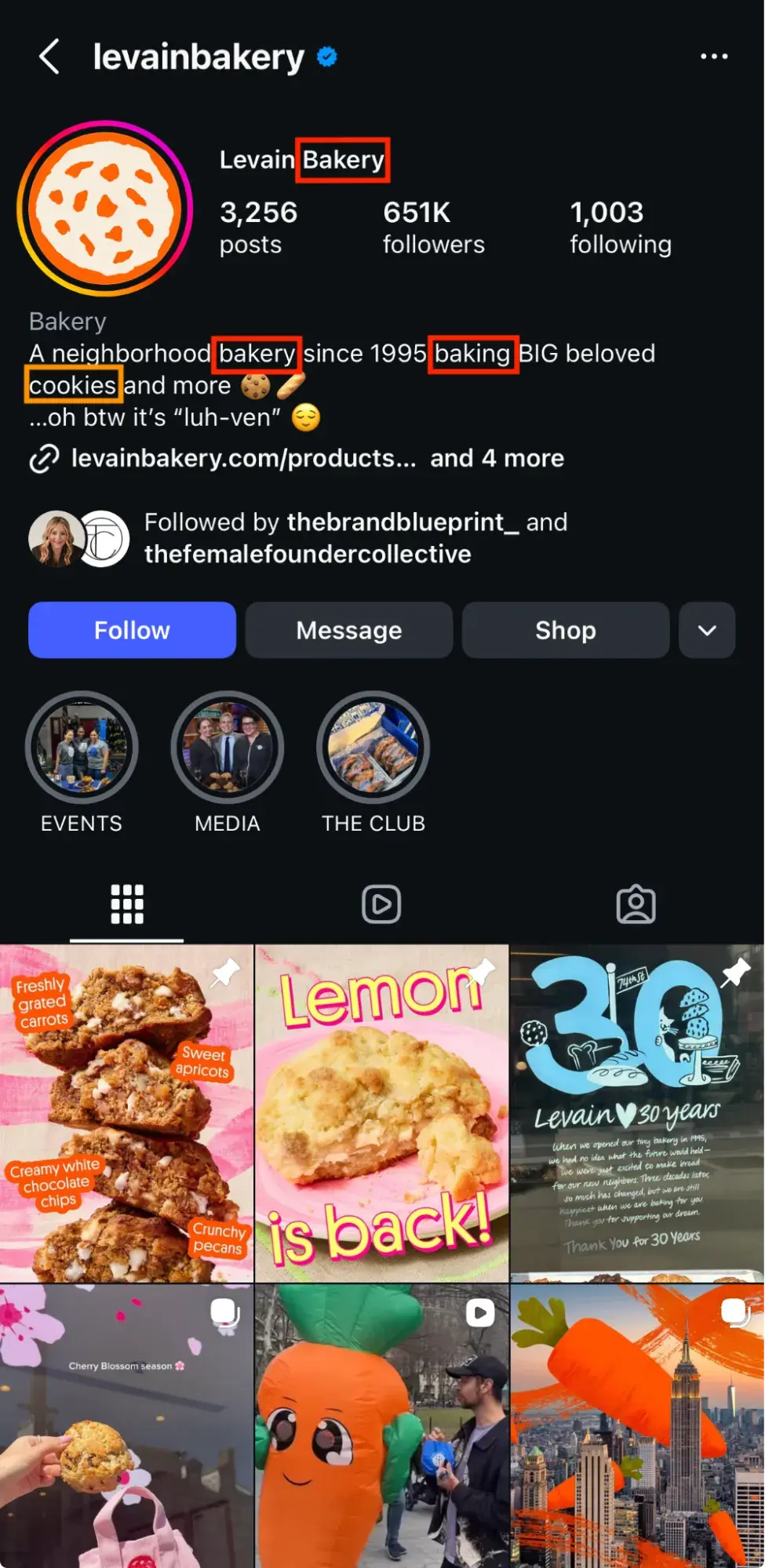
As you can see, Levain has done a great job crafting an informative and fun bio that still includes a few important search-optimized keywords. A person looking for baked goods would likely follow Levain if it appears in search results, as the account aligns with the user’s search intent.
Pro Tip: Secondary keywords are like a safety net. They catch the people who might not be searching for your primary keyword, but could still be interested in your product. Language differences often lead people to use different words for the same thing, so be sure to consider synonyms that could also make good secondary keywords.
4. Leverage your image captions.
In addition to adding keyword-rich hashtags to your post, the image caption itself presents another opportunity to optimize.
Keep your content authentic to fit your image, but be sure to fold in some of your brand’s secondary keywords. Craft a compelling, engaging caption that satisfies existing followers and is keyword-rich to attract new ones.
A robust caption can do more than just catch a user’s attention. It can also help you show up in search. Using secondary keywords in the caption allows the algorithm to determine that you’re what your unique audience is looking for.
The example below shows how Warby Parker uses keywords in its caption to attract the right users:
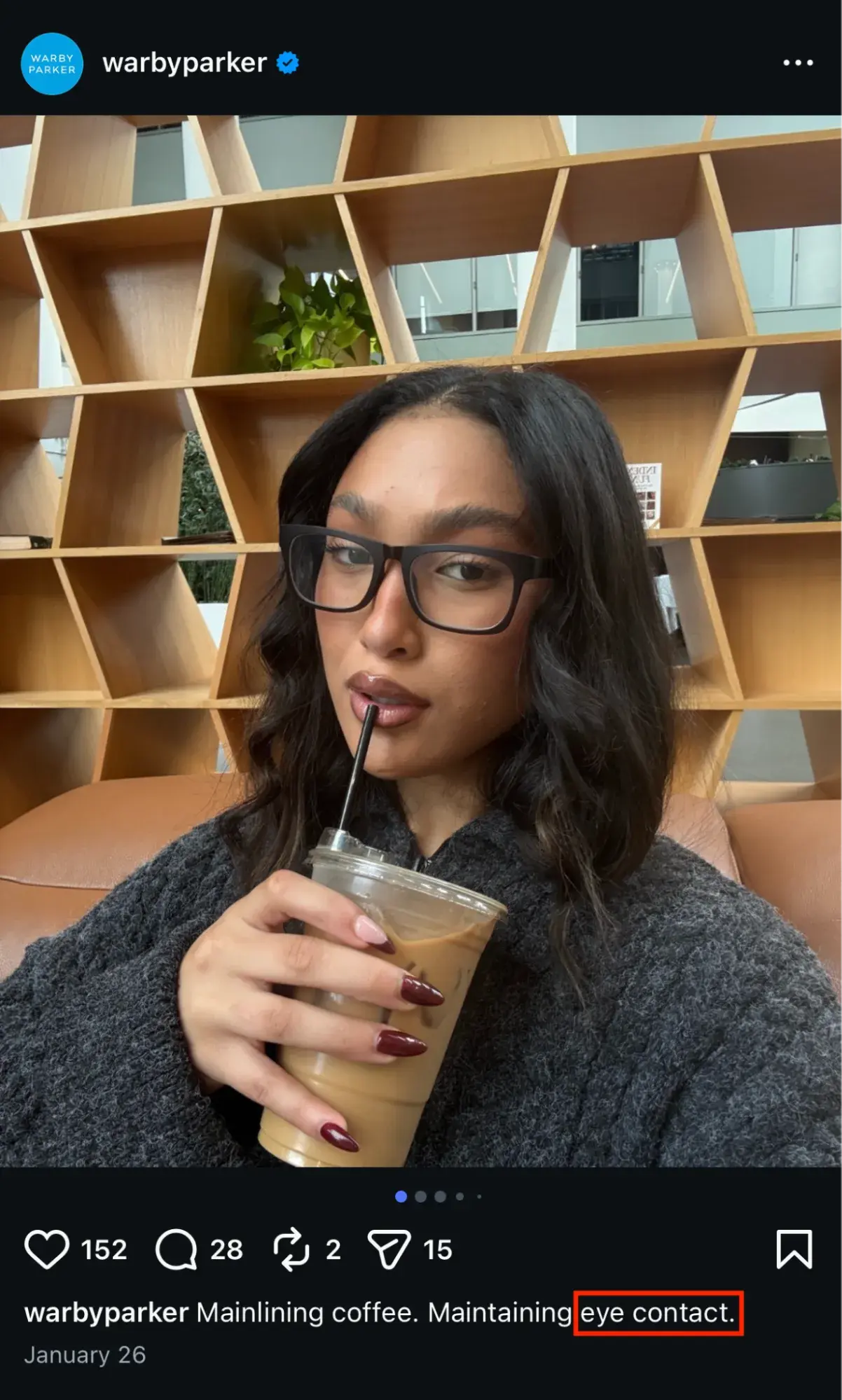
Overall, leveraging your image captions helps create a complete picture for Instagram’s algorithm and signals to it that you should rank high in its search results for those terms.
5. Take advantage of Instagram alt text.
Instagram’s alt text feature was designed to help visually impaired users enjoy their Instagram experience, but it can also be used for SEO.
Instagram will automatically populate alt text options if you skip this step. Still, it’s better to do it yourself to ensure the caption matches what’s actually in the photo and puts it in context with your brand.
To access your alt text options, advance to the screen just before you share your photo and click the “advanced settings” tab at the bottom.
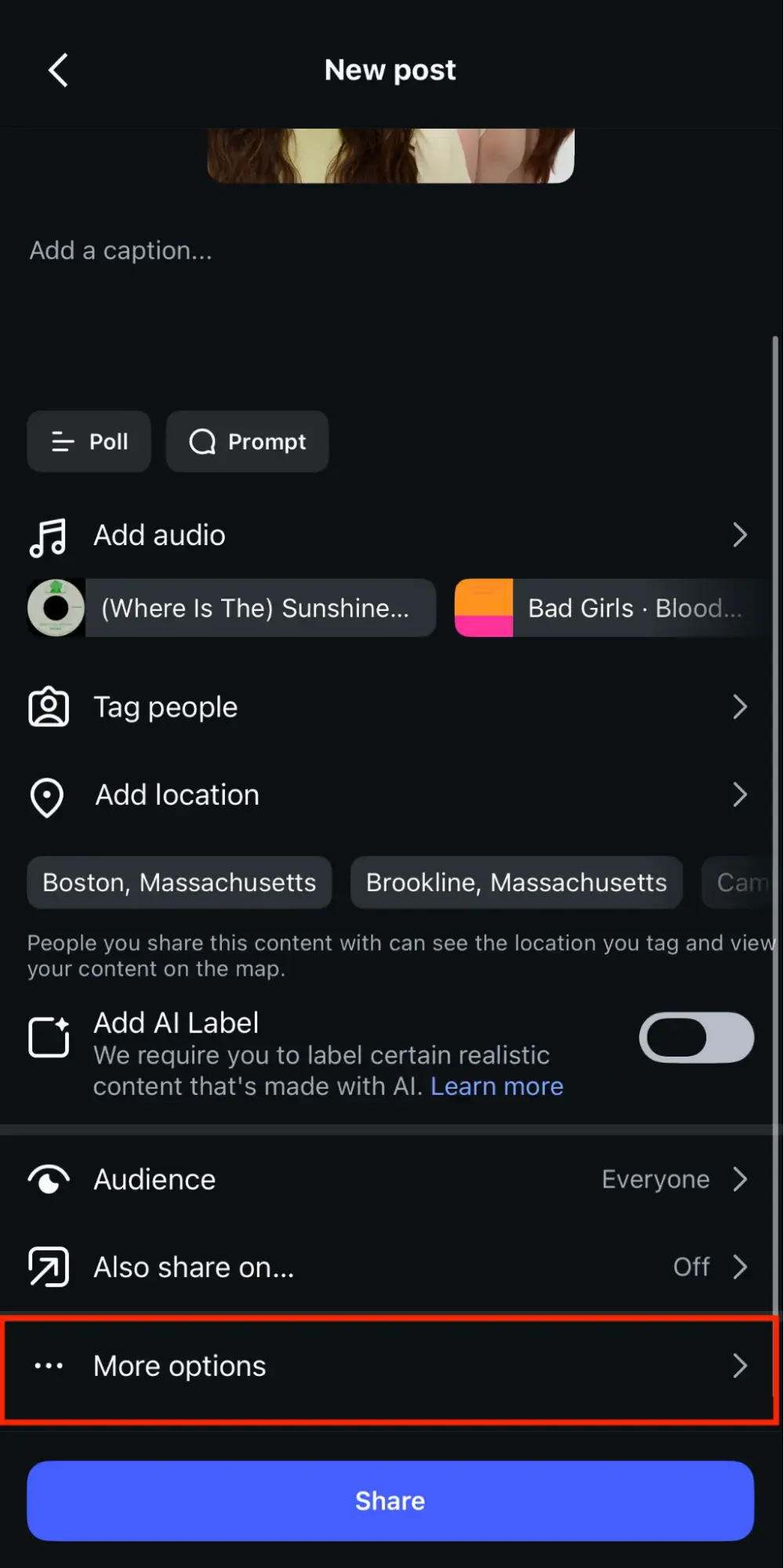
Once you’ve done that, scroll to the bottom to where it says “Accessibility” and select the “Write Alt Text” option. From there, you can craft the perfect image description!
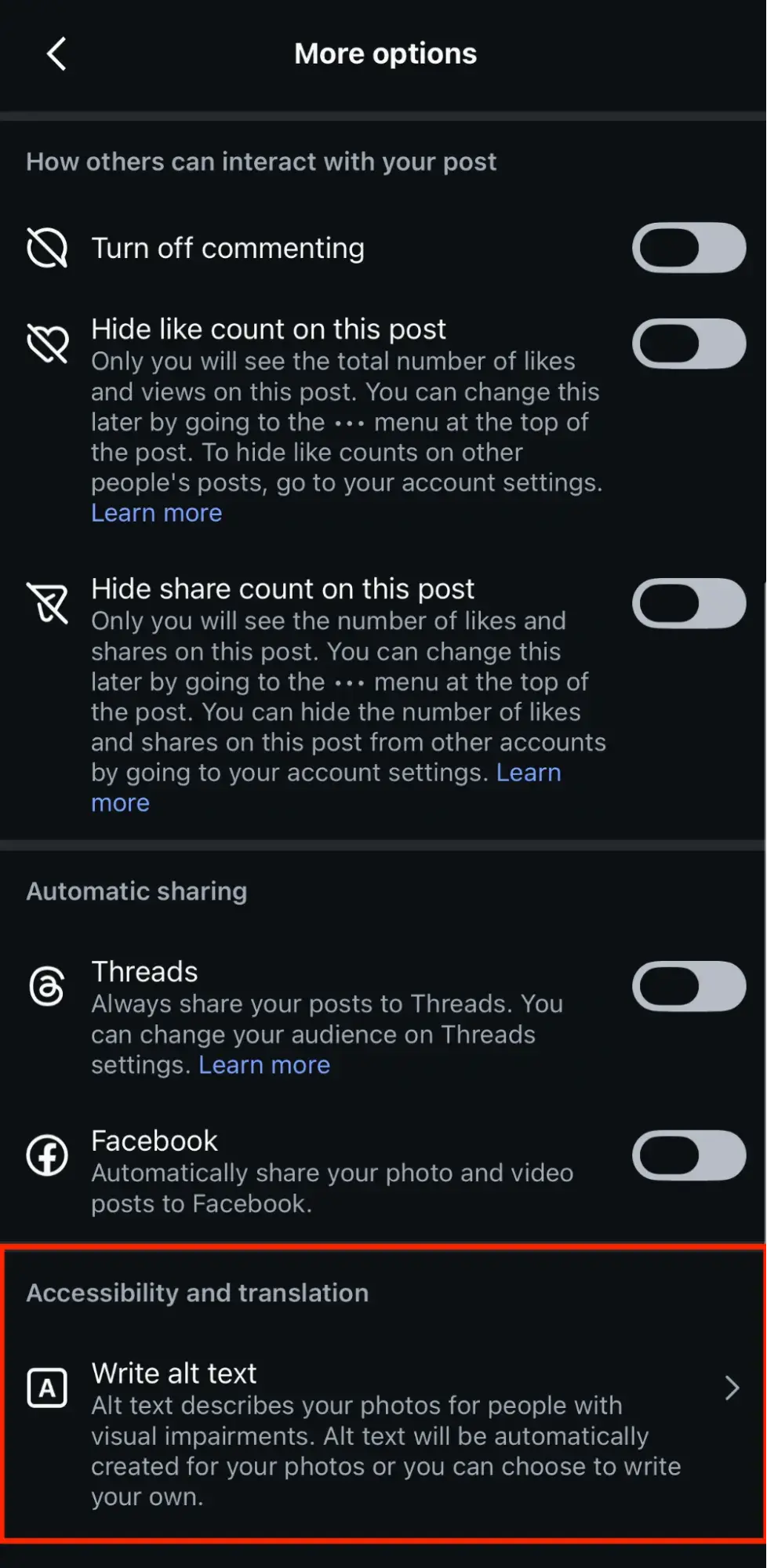
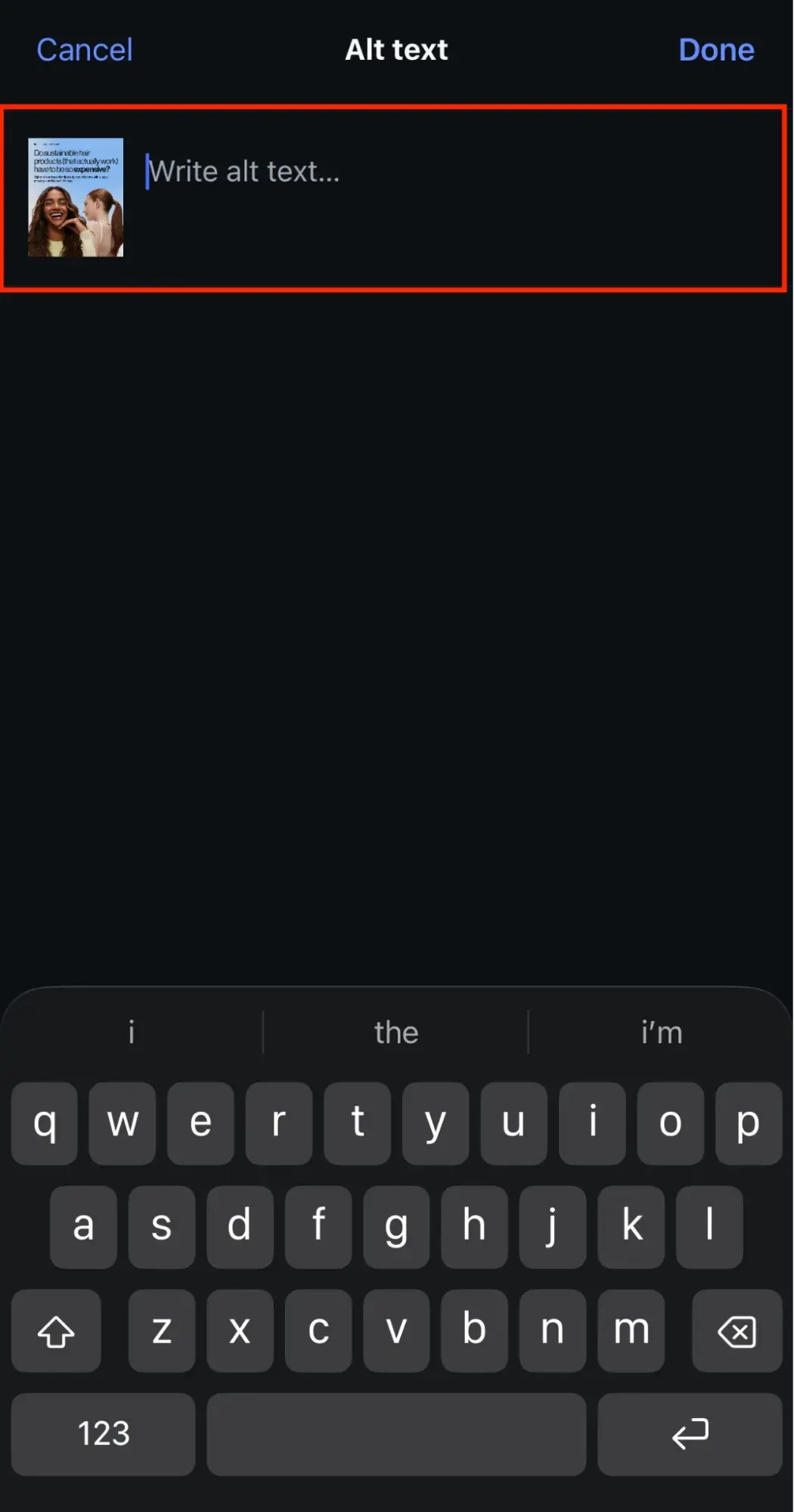
Once you’ve crafted your own alt text, share your photo as normal. The benefits of changing your Instagram alt text are the same as when you use alt text on photos for your website.
All-in-all, optimizing your alt text can help your posts rank better in the algorithm, and what’s more, it also adds the possibility of having your results pulled for voice search, too.
6. Track everything with analytics.
If this is your first time using SEO to grow, you should track how your new Instagram strategy affects your overall social media goals.
While Instagram does have an in-platform analytics feature, it only lets you pull data from specific windows, which are as follows:
Free Instagram for Business Kit
Learn how to get followers, build your audience, navigate algorithm updates, and measure success.
- Best Practices Guide
- Instagram Templates
- Expert Tips
- And More!
Download Free
All fields are required.
Form not available
You're all set!
Click this link to access this resource at any time.
- Previous Month
- Last 14 Days
- Last 30 Days
- Last 60 Days
- Last 90 Days
Once these windows close, the data is lost and replaced. While that might be fine for the casual user, it’s not ideal for marketing purposes.
Pro Tip: Social media tools like , , or let you bypass this with robust analytics, automated reporting, and more. They allow users to analyze posts and campaign performance so you can optimize your content for the future.
7. Avoid these black hat SEO techniques.
You might think that Google is the only website sophisticated enough to spot and punish users for using black hat SEO tactics. However, with the expansion of AI to handle the dense computational minutiae, those days are over.
Instagram has been cracking down on accounts that try to cheat the system.
Infamously, they’ve implemented a shadowban for users who break the rules. This means nobody can see your content when they click a hashtag you’ve used. Even your followers can’t see that content unless they specifically search for your account and visit your profile.
Basically, here’s the 411 on what to avoid:
- Don’t steal content
- Don’t use bots
- Don’t keyword stuff
- Don’t follow too many accounts too fast
- Don’t buy followers
Pro tip: SEO is a long-term strategy, and it can be frustrating when you don’t see results immediately. The quick fix can be tempting, but the results can be disastrous if you get caught. If you’re looking to build your Instagram account the right way, avoid these tactics at all costs.
8. Navigate banned hashtags.
There are some strange realities in tech right now: AI art programs crank out nightmarish hands (Google at your own risk), , and Instagram has some weirdly banned hashtags.
Some content creators knowingly exploit hashtags to promote illicit content. #costumes, for example, could be popular around Halloween.
You can also imagine how that can quickly lead to problematic content in terms of indecent exposure and violating children’s rights.
Additionally, Instagram doesn’t want you to direct traffic away from the platform by using hashtags affiliated with other social media platforms. If you use #snapchat, you risk the algorithm flagging you for a shadowban or even permanently banning you from the IG platform.
Pro tip: You can check recently , or you can take things into your own hands by searching for the hashtag you’re considering using. If content shows up and flows freely, it’s not banned.
If you get the dreaded “Recent posts from [the hashtag you searched for] are currently hidden”, then you know not to use that hashtag.
Frequently asked questions (FAQs) about Instagram optimization
What is Instagram optimization?
As mentioned, Instagram optimization is the process of strategically adjusting your:
- Profile
- Content
- Engagement habits
Again, this is done so Instagram’s search and recommendation systems surface your account to relevant audiences. Plus, it applies core SEO principles (i.e., keyword targeting, metadata optimization, and authority building) to how Instagram indexes and ranks content across:
- Search
- Explore
- Reels
- Suggested feeds
Instagram SEO works because the platform’s search engine evaluates specific text fields (i.e., username, display name, bio, captions, alt text, and hashtags) to determine what your account is about and when to show it.
How do you optimize your Instagram account?
Instagram account optimization spans three layers:
- Profile
- Content
- Engagement
Here’s how to optimize your Instagram profile and the content it houses:
- Profile fields. Place your primary keyword in your display name (not just your handle) and write a bio that describes what you do using language your audience actually searches. Select the most accurate profile category, since Instagram uses it as a ranking signal.
- Content metadata. Write captions that lead with searchable, descriptive language rather than burying keywords after several lines. Add specific alt text to every image, use 3 to 5 highly relevant hashtags per post instead of 30 generic ones, and tag your location when applicable.
- Posting cadence and format. Instagram’s algorithm prioritizes recency and format diversity. Publishing Reels, carousels, and Stories consistently (not just static images) signals to the system that your account is active and versatile.
- Engagement patterns. Respond to comments and DMs quickly. Instagram treats engagement velocity (how quickly a post generates interactions) as a ranking factor, and creator responsiveness directly feeds into that signal.
Pro Tip: For teams running Instagram profile optimization alongside other platforms, lets you schedule, publish, and track Instagram content from a single dashboard.
What are the Instagram algorithm secrets?
There’s no single Instagram algorithm. Instagram uses a separate ranking system for each surface — Feed, Stories, Explore, and Reels — and each one weighs signals differently. That said, the core ranking factors across all surfaces are well-documented:
- Relationship. How often a user interacts with your account (likes, comments, DMs, profile visits) determines how prominently your content appears in their feed. Reciprocal engagement matters.
- Interest. Instagram predicts whether a user will engage with a piece of content based on their past behavior with similar content types and topics. This is why topical consistency in your content strategy improves reach over time.
- Timeliness. Newer posts are prioritized. Publishing when your specific audience is active (visible in Instagram Insights) gives your content the initial engagement velocity it needs to get amplified.
- Content type signals. For Reels specifically, Instagram weighs watch time, replay rate, and shares more heavily than likes. For carousels, swipe-through rate and saves are key indicators.
Pro Tip: The real “secret” is that these systems are compounding. Consistent SEO across your profile and content trains the algorithm to understand your account's topic, audience, and value over time.
Why is nobody seeing my Instagram posts?
Low reach on Instagram typically traces back to one or more identifiable, fixable issues:
- Shadowban or guideline flags. If you've used banned hashtags, triggered spam filters through aggressive follow/unfollow behavior, or received repeated content violations, Instagram may be suppressing your distribution. Check your Account Status in Settings to confirm.
- Weak profile signals. An incomplete bio, a generic username, or a missing profile category gives Instagram insufficient data to optimize your profile for search and recommendations. Without clear topical signals, the algorithm doesn't know who to show your content to.
- Low engagement velocity. Instagram tests new posts with a small segment of your audience first. If that initial group doesn’t engage quickly (likes, comments, shares, saves within the first 30 to 60 minutes), distribution stalls. Posting when your audience is offline is a common cause.
- Format mismatch. If you're posting only static images while Instagram prioritizes Reels and carousels in its algorithm, your content may be deprioritized compared to accounts using those formats.
- Content-audience misalignment. Posting on topics that don’t match what your followers originally followed you for confuses Instagram's interest-prediction model, which lowers your ranking in their feeds.
TLDR: Diagnosing the specific cause requires looking at your reach and engagement data post by post. Instagram optimization isn’t about “posting and praying.” It’s pattern recognition, and tools like give you the cross-channel analytics to spot exactly where distribution is breaking down.
Optimize your Instagram for SEO, optimize your social media marketing strategy
After everything I’ve shared in this article, I hope the takeaway that's sticking is that Instagram SEO isn’t a content hack. It’s a structural advantage.
When you commit to Instagram optimization, you’re not just tweaking a bio or adding hashtags. You’re making an informed decision about:
- How discoverable your brand is at the point of search. Instagram’s search engine indexes your username, display name, bio, captions, alt text, and hashtags. Every one of those fields is either working for your discoverability or silently limiting it.
- Who finds you and whether they stay. Knowing how to optimize your Instagram profile means aligning what you say about your brand with what your audience is actively searching for, so the people who land on your profile are already primed to follow, engage, and convert.
- How the algorithm treats every piece of content you publish. Instagram profile optimization isn’t isolated to your profile page. It sets the topical foundation that Instagram’s recommendation systems use to classify and distribute your Reels, carousels, and Stories across Explore, suggested feeds, and search results.
- Where your brand shows up in culture, not just in your category. The accounts with winning reach in 2026 aren’t posting more; they’re indexed better. They’ve built enough topical authority that Instagram’s systems actively surface them to new audiences without paid amplification.
Instagram account optimization only compounds when it’s consistent. Defining your keyword strategy is step one, applying it across every profile field and content asset is step two, and refining based on performance data never stops.
Ready to turn your strategy into a repeatable, scalable system? Get started with to publish, measure, and optimize your Instagram presence alongside every other channel — from one platform, with one source of truth.
Free Instagram for Business Kit
Learn how to get followers, build your audience, navigate algorithm updates, and measure success.
- Best Practices Guide
- Instagram Templates
- Expert Tips
- And More!
Download Free
All fields are required.
Form not available
You're all set!
Click this link to access this resource at any time.
Instagram Marketing



![41 Instagram features, hacks, & tips everyone should know about [new data]](https://53.fs1.hubspotusercontent-na1.net/hubfs/53/Instagram-hacks-1-20240916-2633447.webp)

![How to Use Instagram: A Beginner's Guide [Expert Insights + New Data]](https://53.fs1.hubspotusercontent-na1.net/hubfs/53/how-to-use-instagram_0.webp)
![The Pros and Cons of Instagram Marketing [Honest Advice & New Data]](https://53.fs1.hubspotusercontent-na1.net/hubfs/53/pros-and-cons-instagram-featured.png)
![How to use Instagram for Business [new data and insights]](https://53.fs1.hubspotusercontent-na1.net/hubfs/53/instagram-for-business-1-20260206-9933950-1.webp)
![The 黑料吃瓜网 Blog’s 2026 Instagram Marketing Report [Data from 600+ Instagram Marketers]](https://53.fs1.hubspotusercontent-na1.net/hubfs/53/instagram-marketing-report-1-20260515-715628-1.webp)
![601 Most Popular Instagram Hashtags in 2024 [+ Trends & Data]](https://53.fs1.hubspotusercontent-na1.net/hubfs/53/instagram-hashtags_2.webp)