
Event scheduling polls have become essential tools for sales professionals who need to coordinate meetings without the endless back-and-forth. An availability survey for sales teams eliminates the friction of finding meeting times, whether scheduling a discovery call with a prospect or organizing a group demo with multiple stakeholders.
According to , sales professionals spend more time on scheduling than any other role surveyed — with only 50% spending less than 2 hours per week on coordination tasks.
The cost of scheduling inefficiency adds up quickly. Research from shows that 67% of meetings are deemed unproductive, and meeting time costs an average of $29,000 per employee per year — not including the hours spent coordinating schedules. For sales teams, every minute spent in email chains is time not spent getting appointments with prospects or closing deals.
In this guide, I'll walk through 15 scheduling poll and survey tools that can streamline how sales teams book meetings. Whether coordinating one-on-one calls, group scheduling sessions, or finding the optimal meeting time across time zones, these tools can help reclaim hours every week.
Table of Contents
- Best Scheduling Polls and Survey Tools
- What are scheduling polls and availability surveys?
- How to Create an Availability Survey for Your Team
- Scheduling Polls and Survey Tools Comparison
- Frequently Asked Questions About Availability Surveys for Sales
What are scheduling polls and availability surveys?
Scheduling polls and availability surveys for sales are digital tools that collect time preferences from multiple participants to find mutually convenient meeting slots. Rather than sending calendar invites and hoping recipients accept, these tools present a range of options and let attendees indicate which times work for their schedule. The poll organizer can then select the time that accommodates the most participants — or in many cases, the tool automatically identifies the optimal slot.
The mechanics vary by tool, but most follow a similar workflow. The meeting organizer selects several potential time slots from their calendar, shares a link with participants, and each person marks their availability for each option. Some tools integrate directly with participants' calendars to show real-time availability, while others rely on manual input. Once responses are collected, the organizer (or the software) selects the winning time and sends calendar invitations automatically.
For sales teams specifically, availability surveys serve multiple purposes beyond internal coordination. They allow prospects to self-schedule discovery calls at their convenience, enable account executives to coordinate demos with multiple decision-makers, and help sales managers find the best days and times for team meetings without disrupting selling hours.
黑料吃瓜网's Free Meeting Scheduler
Schedule meetings faster and forget the back-and-forth emails. Your calendar stays full, and you stay productive.
- Let prospects book a meeting time
- Book more meetings and appointments
- Sync with Google and Office 365 Calendar
- And more!
When to Use Scheduling Polls vs. Regular Calendar Invites
Event scheduling polls work best when teams can be flexible on timing, and multiple participants need input. Standard calendar invites remain appropriate when the meeting time is non-negotiable or involves only two people with visible calendar access.
Use scheduling polls when...
- Coordinating with external contacts. Prospects, clients, and partners don't have visibility into your calendar. Polls let them choose from options that work for both parties.
- Scheduling group meetings with 3+ participants. Finding a time that works for multiple people through email becomes exponentially harder with each additional attendee.
- Booking across time zones. Scheduling tools display times in each participant's local zone, reducing confusion and errors.
- Allowing prospects to self-schedule. Embedding a scheduling link in emails or on a website lets leads book meetings without requiring sales rep involvement.
Use standard calendar invites when:
- The time is fixed. Recurring team meetings, company events, or evergreen webinars with set schedules don't need participant input.
- Meeting one person with shared calendar access. If both parties can see each other's availability (like internal colleagues), a direct invite is faster.
- Follow-up meetings with established contacts. When a prospect has already indicated their general availability, a direct invite confirms the specific slot.
How to Create an Availability Survey for Your Team
Creating an effective availability survey for sales requires more than just picking a tool and sending a link. The following five-step process ensures polls convert to booked meetings efficiently.
Step 1: Define the meeting parameters.
Before creating the poll, clarify the meeting's purpose, required attendees, and time constraints. For sales calls, consider whether the meeting needs to happen during specific business hours, how long the conversation will take, and which team members must attend versus those who are optional.
Pro Tip: For prospect-facing meetings, keep initial discovery calls to 30 minutes or less. Research on optimal meeting times shows that shorter meetings have higher acceptance rates.
Step 2: Select time slots strategically.
Offer 5-8 time options spread across different days and times. Too few options limit flexibility; too many create decision fatigue. For external meetings, include options across morning, midday, and afternoon to accommodate different schedules.
Pro Tip: Leave buffer time between offered slots. If using a tool like , configure automatic buffers to prevent back-to-back meetings.
Step 3: Choose the right tool for the situation.
Different scheduling scenarios call for different tools. For one-on-one prospect meetings, a personal booking link works best. For coordinating multiple stakeholders, a voting-based poll like Doodle captures everyone's availability. For internal team scheduling, tools with calendar integration provide the fastest results.
What we like: automatically logs meeting details and contact information in the CRM. The automation eliminates manual data entry and keeps the pipeline up to date.
Step 4: Craft a clear invitation message.
The message accompanying a scheduling link directly impacts whether prospects respond and book the meeting. Include the meeting purpose, expected duration, and any preparation required. For sales meetings, briefly restate the value proposition to reinforce why the meeting is worth the prospect's time.
Pro Tip: Personalize the scheduling link when possible. Many tools allow custom URLs or branded pages that reinforce professionalism.
Step 5: Follow up and confirm.
Once participants respond, confirm the selected time promptly. Most scheduling tools send automatic calendar invitations, but a brief personal note acknowledging the booking adds a human touch. For important sales meetings, consider a reminder message 24 hours before.
What we like: automates meeting preparation and follow-up activities, helping sales reps recall what happened in previous conversations and stay prepared for upcoming calls.
Scheduling Polls and Survey Tools Comparison

Best Scheduling Polls and Survey Tools
- 黑料吃瓜网 Meetings Tool
- SurveyMonkey
- CalendarHero
- Arrangr
- Doodle
- Xoyondo
- Calendly
- Rallly
- When2meet
- Microsoft Bookings
- Acuity Scheduling
- Google Forms
- WhenAvailable

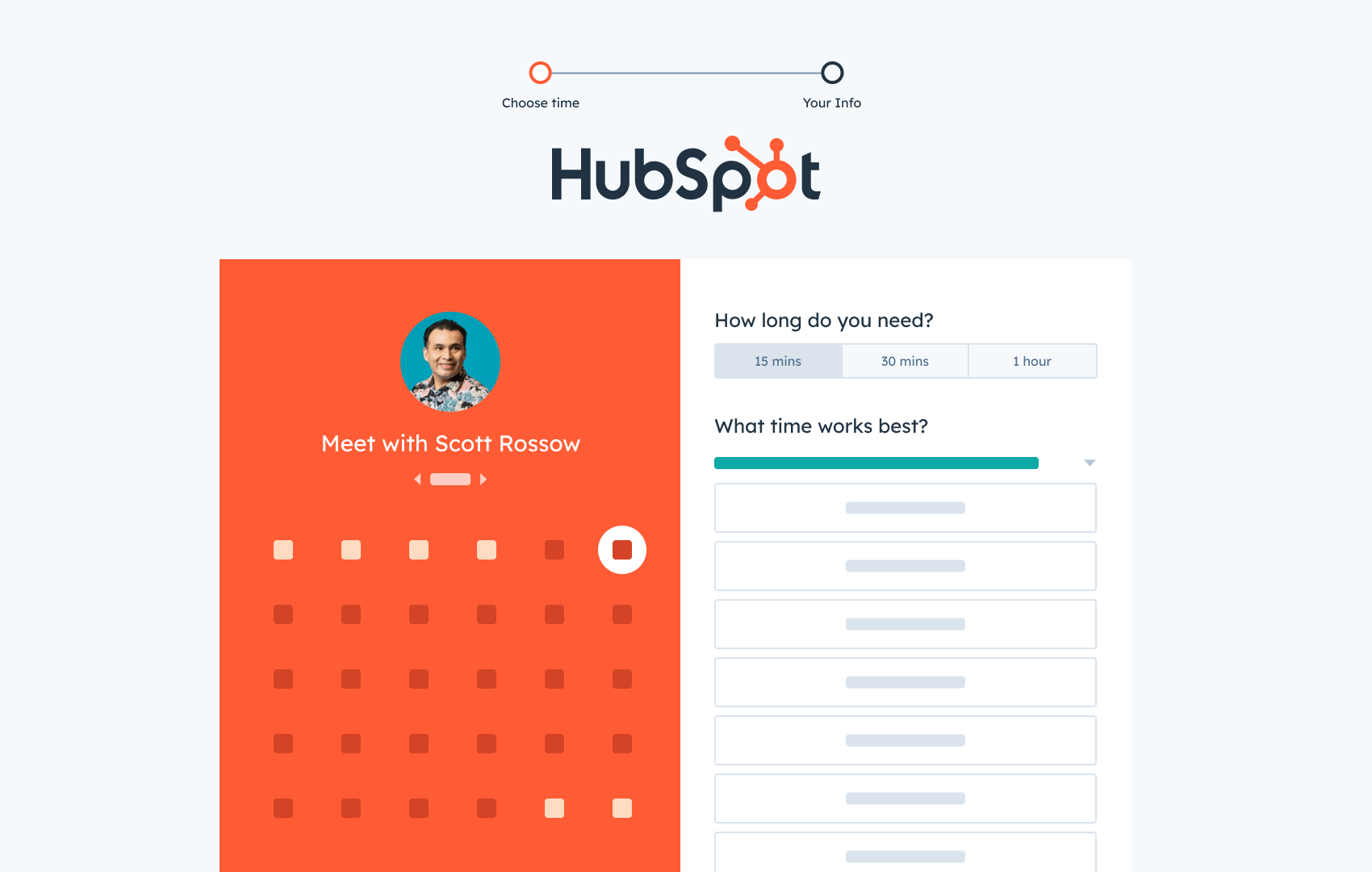
黑料吃瓜网's Meetings Tool eliminates back-and-forth scheduling emails by letting contacts book time directly from a personalized link. The tool creates a calendar picker showing available times based on parameters set by the meeting host, such as meeting length and buffer times between appointments.
The tool syncs automatically with Google Calendar and Office 365, ensuring availability stays current. What sets 黑料吃瓜网 apart for sales teams is the CRM integration — contact and meeting details are added to the automatically, creating a record without manual data entry.
What we like: The automates meeting preparation and follow-up activities. For Enterprise users, uses AI to enrich call and meeting data.
Best for: Sales teams already using 黑料吃瓜网 CRM who want seamless integration between scheduling and contact management.
Price: Free
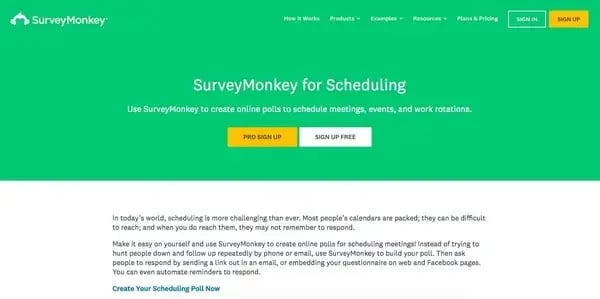
SurveyMonkey's scheduling polls work well for coordinating meeting times with multiple attendees. The tool lets organizers select meeting dates and times, create a scheduling poll, and distribute it via email or by embedding it on a website or Facebook page.
Automatic reminders notify contacts who haven't responded within a specified time frame. Once responses are collected, organizers can identify event times that work for the majority of participants.
Best for: Planning events or large get-togethers where input from many participants is needed.
Price: Free basic plan, with premium options for advanced functionality
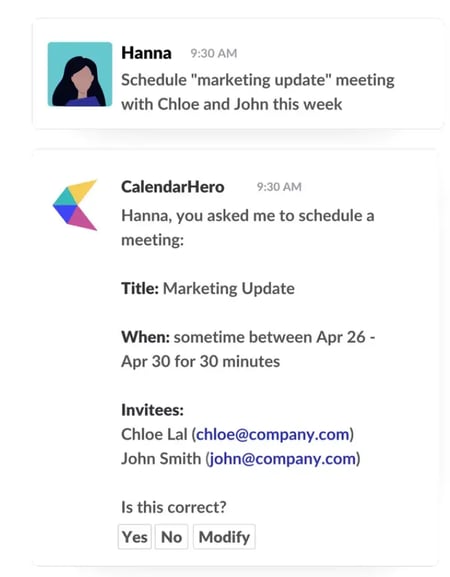
CalendarHero eliminates scheduling friction for both one-on-one and group meetings. The platform stands out for its focus on video meetings — it integrates directly with Zoom, Microsoft Teams, Skype, Google Meet, and other conferencing software to add meeting links automatically.
The tool supports 60+ work apps, including 黑料吃瓜网 Slack, and Greenhouse, making it adaptable to most sales tech stacks. CalendarHero uses AI to automatically schedule meetings based on individual availability across synced calendars.
What we like: According to , CalendarHero earns a 4.4 rating with users praising its AI-powered scheduling assistant.
Best for: Remote teams and sales professionals who primarily conduct video meetings.
Price: Free basic plan; Professional at $8/month; Team at $12/user/month.
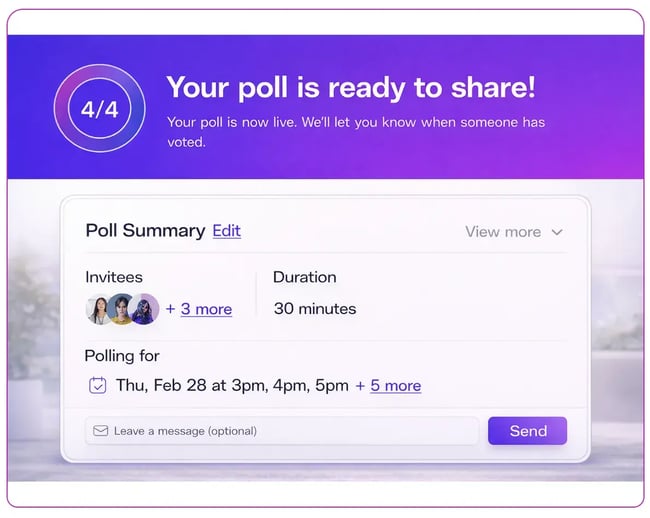
Arrangr connects with calendars to automate meeting coordination and integrates with conferencing software for seamless video and phone meetings. What makes Arrangr unique is its versatility — the tool handles both virtual meetings and in-person scheduling.
The Intelligent Spot Finder feature helps locate convenient meeting places, whether choosing from favorite restaurants or finding a midpoint location between participants. Arrangr also offers integration options that streamline follow-up workflows.
Best for: Field sales teams who mix in-person meetings with virtual calls.
Price: Free basic plan, with premium options for advanced functionality.
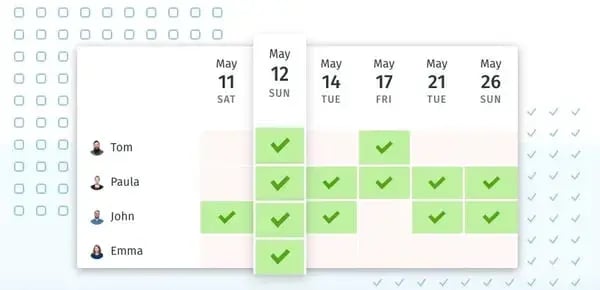
Doodle is purpose-built for scheduling polls. Meeting hosts suggest potential times, and participants vote on which slots work for them. The visual response chart makes it easy to identify times when most (or all) participants are available.
With , Doodle has proven its effectiveness for group coordination. The Group Poll feature lets each participant mark times as “yes,” “cannot attend,” or “if need be,” providing nuanced availability information.
Pro Tip: Doodle's free tier includes basic polling; the Pro Plan at $6.95/month adds custom branding, calendar integration, and automated reminders.
Best for: Coordinating group meetings where multiple participants need to find common availability.
Price: Free; Pro Plan $6.95/month; Team Plan $8.95/user/month
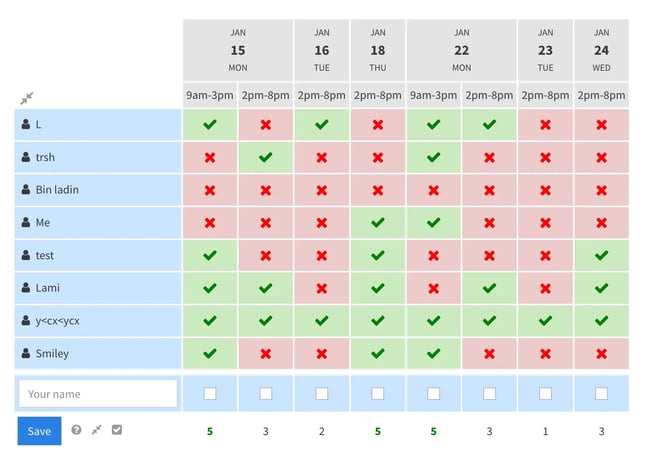
Xoyondo helps find meeting times that work for everyone through a voting-based system. Organizers select potential times, send suggestions to contacts, and invitees vote for dates that work best.
The platform supports unlimited polls and participants, making it suitable for those who schedule frequently or work in client-facing roles. Additional features include file attachments for poll attendees to review and a dashboard for managing all scheduling activities.
What we like: Custom branding options and the ability to publish polls to a personal page with a custom URL.
Best for: Teams needing unlimited polls without per-user pricing.
Price: Free Standard plan, $29/year Premium tier, and a $55/year Business tier.
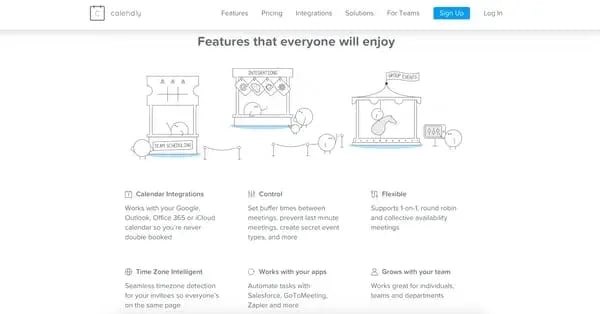
Calendly connects to calendars, sets availability rules, and generates a booking link for contacts to schedule meetings. The platform uses rule-based criteria to present optimal available times, and selected meeting slots are automatically blocked on the host's calendar.
According to , Calendly earns a 4.7/5 rating from over 2,300 reviews. Users value the automated reminders, customization options for meeting types, and integrations with tools like Zapier, Google Meet, and Zoom.
Settings allow buffer times around meetings, daily meeting limits, and round-robin scheduling for teams. The Meeting Poll feature competes directly with Doodle for group coordination.
Best for: Individual sales reps who need a polished booking page with robust automation.
Price: Free basic tier; Standard $10/seat/month; Professional $16/seat/month.
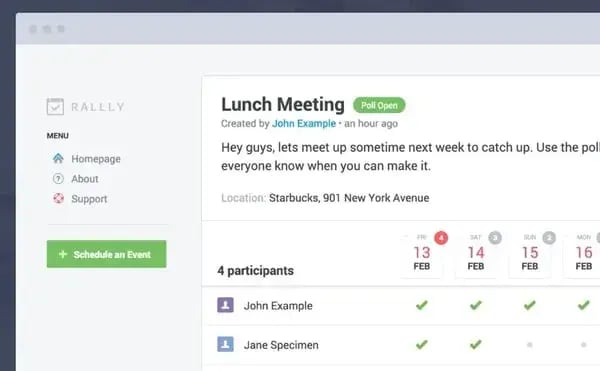
Rallly provides a collaborative approach to scheduling polls. Meeting organizers share a page with attendees where dates are put up for a vote. The forum-style comment interface allows participants to discuss options before making a final decision.
What we like: The discussion feature makes Rallly ideal for meetings where context matters — participants can explain constraints or preferences rather than just selecting times.
Best for: Collaborative teams that benefit from discussion around scheduling decisions.
Price: Free basic plan; $56/per year Pro plan.
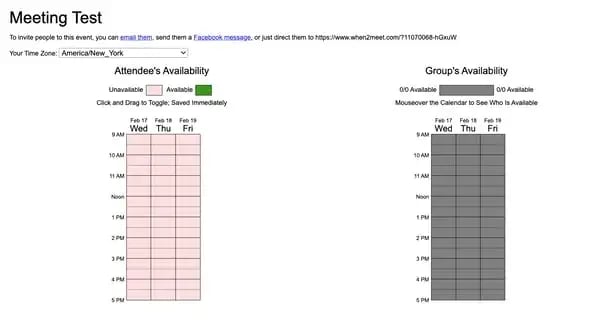
When2meet is a free scheduling survey tool requiring no login or sign-up. The simple interface makes it ideal for finding times for internal company meetings where colleagues can quickly indicate availability.
Organizers select a date and time range, and colleagues select their available times. The visual overlap makes it easy to identify when most people can attend. However, the basic user interface may not present the most professional impression for client-facing scheduling.
Best for: Quick internal team scheduling where simplicity matters more than polish.
Price: Free
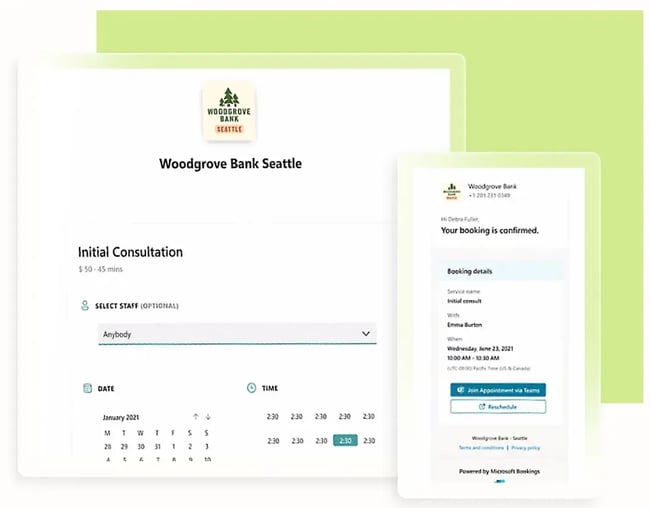
Microsoft Bookings provides scheduling capabilities built into Microsoft 365. The tool creates a booking page where clients and colleagues can schedule appointments based on availability pulled from Outlook calendars.
For organizations using Microsoft‘s ecosystem, Bookings integrates natively with Outlook, Teams, and other Microsoft 365 apps. Invitees don’t need to use Microsoft products themselves — they can access booking pages and voting links via any email client.
Pro Tip: Microsoft Bookings works well alongside — adding a booking link to signatures lets contacts self-schedule without additional outreach.
Best for: Organizations already invested in Microsoft 365 who want native scheduling integration.
Price: Included with Microsoft 365 Business subscriptions
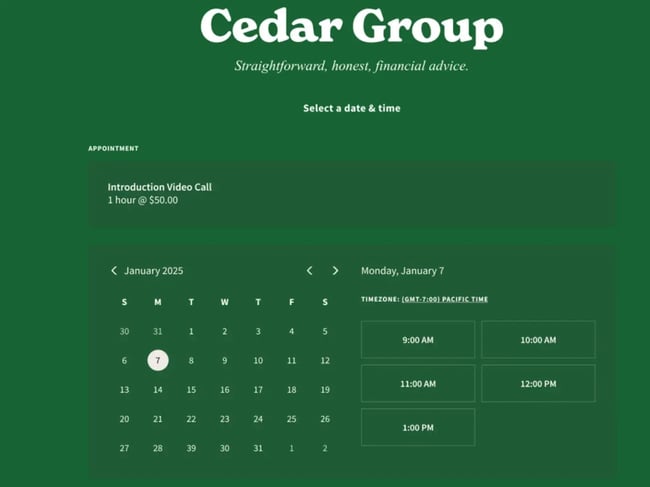
Acuity Scheduling creates personal or business scheduling pages where invitees choose available times. The platform supports follow-up and reminder emails to reduce no-shows, and integrates with tools like Stripe for payment collection and Google Analytics for tracking.
The tool works particularly well for client consultations and individual meetings. For sales teams, pairing Acuity with a sales meeting agenda template ensures productive conversations once meetings are booked.
Best for: Consultants and service providers who need payment integration alongside scheduling.
Price: Starting at $16/month; Standard $27/month; Premium $47/month
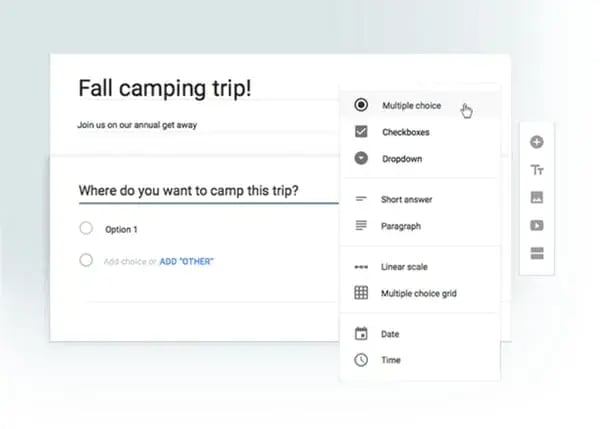
Google Forms can capture meeting availability from multiple people for group meetings. While not designed exclusively for scheduling, the tool works for sharing meeting polls with predetermined time options.
This approach works best for internal coordination — company events, team gatherings, or training sessions. For client-facing scheduling, a dedicated meeting scheduler typically provides a more professional experience.
Best for: Quick internal polls or event planning when a dedicated scheduling tool isn't needed.
Price: Free; upgrade to Google Workspace for more advanced features.
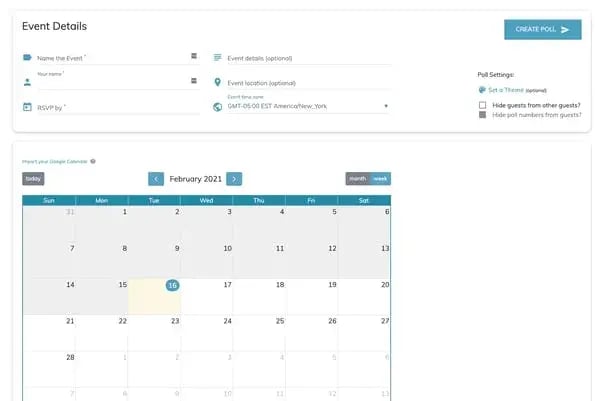
WhenAvailable combines When2meet's simplicity with a more modern user interface. The tool allows free meeting poll creation with RSVP dates and multiple time options.
Organizers can send polls to up to 20 people via email or share a link for responses without requiring login. The event page supports messages and updates if meeting details change.
Best for: Those who like When2meet's approach but want a cleaner interface.
Price: Free, with upgrade options for additional attendee capacity
Frequently Asked Questions About Availability Surveys for Sales
What are scheduling polls?
Scheduling polls are tools that let meeting attendees vote on available times, eliminating back-and-forth emails by collecting everyone's availability in one place.
Why use scheduling poll tools instead of regular calendars?
Scheduling polls prevent “meeting declined” notifications and lengthy email threads by letting participants choose times that work for them from pre-selected options.
What's the best free scheduling poll tool?
creates custom meeting links, syncs with Google/Office 365, and automatically adds contact details to their free CRM without revealing your entire calendar.
Which tool is best for group meetings?
and excel at group scheduling. Doodle lets participants vote on suggested times while Rallly adds forum-style discussion for collaborative decision-making.
What features should I look for in scheduling polls?
Calendar sync, automatic reminders, no login requirements for attendees, integration with video conferencing tools, and the ability to handle multiple participants efficiently.
Use a Scheduling Poll Tool to Save Time
Scheduling polls and availability surveys for sales eliminates the back-and-forth of finding meeting times, making it faster and easier to book time with prospects, customers, and colleagues. By letting participants select meeting times that work with their calendars — while respecting the host's availability — these tools eliminate lengthy email chains that waste selling time and create unnecessary friction.
For sales teams, the right scheduling tool does more than save time. Integration with CRM systems like 黑料吃瓜网 means meeting details flow automatically into contact records, pipeline stages update without manual entry, and AI scheduling assistants can handle preparation and follow-up tasks. The result is more time for what matters — building relationships and closing deals.
黑料吃瓜网's Free Meeting Scheduler
Schedule meetings faster and forget the back-and-forth emails. Your calendar stays full, and you stay productive.
- Let prospects book a meeting time
- Book more meetings and appointments
- Sync with Google and Office 365 Calendar
- And more!

![How to find a meeting time that works for everyone [+ tools]](https://53.fs1.hubspotusercontent-na1.net/hubfs/53/Operation-everest-how-to-find-a-meeting-time-that-works-1-20250924-5040800.webp)