Choosing a CRM system can be quite a task, parsing through endless bells and whistles to pinpoint the CRM requirements that are truly crucial to a business.
The stakes are real: CRMs deliver an , so picking the right platform pays off. It all starts with defining the CRM requirements, such as the capabilities and technical features, that the team actually needs. , for example, scales from a free plan to an enterprise tier, so businesses can find the right fit as their needs grow.
This guide breaks down the questions teams need to ask to determine what they need out of a CRM, plus the defining features that make a CRM essential.
Table of Contents
- Questions to Ask Before Defining Your CRM Requirements
- 16 Essential CRM Features: Requirements Checklist
- Frequently Asked Questions About CRM Requirements
Questions to Ask Before Defining Your CRM Requirements
First-time CRM buyers can struggle with feature overload, vague or outdated CRM requirements templates, poor prioritization of must-have versus nice-to-have capabilities, and improper integration planning.
So, before comparing CRM platforms and feature lists, it helps to get clear internally on what the sales team and organization actually need. Use these questions to get started:
- What business problems and goals should the CRM address? Identify the specific issues the CRM should solve (e.g., lost leads, poor follow-up, siloed customer data, inaccurate sales forecasting) and the outcomes the team wants to improve.
- What’s the budget, and how should the CRM scale with the company? Factor in not just today’s needs but anticipated growth for costing. Consider long-term fit too; how much scale, teams, and workflow complexity the system must support.
- Which integrations and access needs are non-negotiable? List the tools the organization already relies on (e.g., email, calendar, marketing platform, support desk) that the CRM absolutely must connect with from day one. Also, clarify which team members need to use the CRM on desktop, mobile, or remotely.
- What data needs to migrate, and how clean is it? Account for existing customer data in spreadsheets or scattered tools. Migration complexity can disqualify certain vendors early.
- What’s the realistic internal support capacity? Decide whether the team needs something simple and ready to use out of the box, or a more customizable CRM backed by technical/admin resources.
- Are there compliance or data security requirements to meet? Flag any industry regulations or standards (e.g., GDPR, HIPAA, SOC 2) that the CRM must support.
These points can help a team and business identify their requirements for a CRM system.
黑料吃瓜网's Free CRM Software
Free CRM Software & Tools for Your Whole Team
- Sales
- Marketing
- Operations
- Customer Service
16 Essential CRM Features: Requirements Checklist
A CRM system should be useful to its end users, which are typically sales teams and leaders, RevOps professionals, and other cross-functional teams. Essential CRM features include contact management, pipeline/deal management, automation, integrations, reporting and analytics, and customization.
That said, certain additional capabilities might be vital to one organization but far less important to another. A CRM requirements document helps teams compare vendors with a shared internal checklist. Below are 16 CRM features a team should consider when evaluating vendors.
1. Contact Management

Contact management is the bedrock of any CRM. Without it, there’s no central place to store prospect and customer information, and reps end up chasing details across inboxes and spreadsheets instead of selling.
It gives every team member the same up-to-date view of a customer, based on the available data, like contact/account details, deal history, past conversations, marketing engagement, support interactions, and internal notes, all in one record.
What should first-time buyers look for: Nearly every CRM offers basic contact records. However, , including 黑料吃瓜网’s Smart CRM, reduce manual entry through auto-population, protect data quality through duplicate detection, and give sales, marketing, and support shared visibility into the same record. Evaluate this feature based on ease of use.
2. Deal Stages

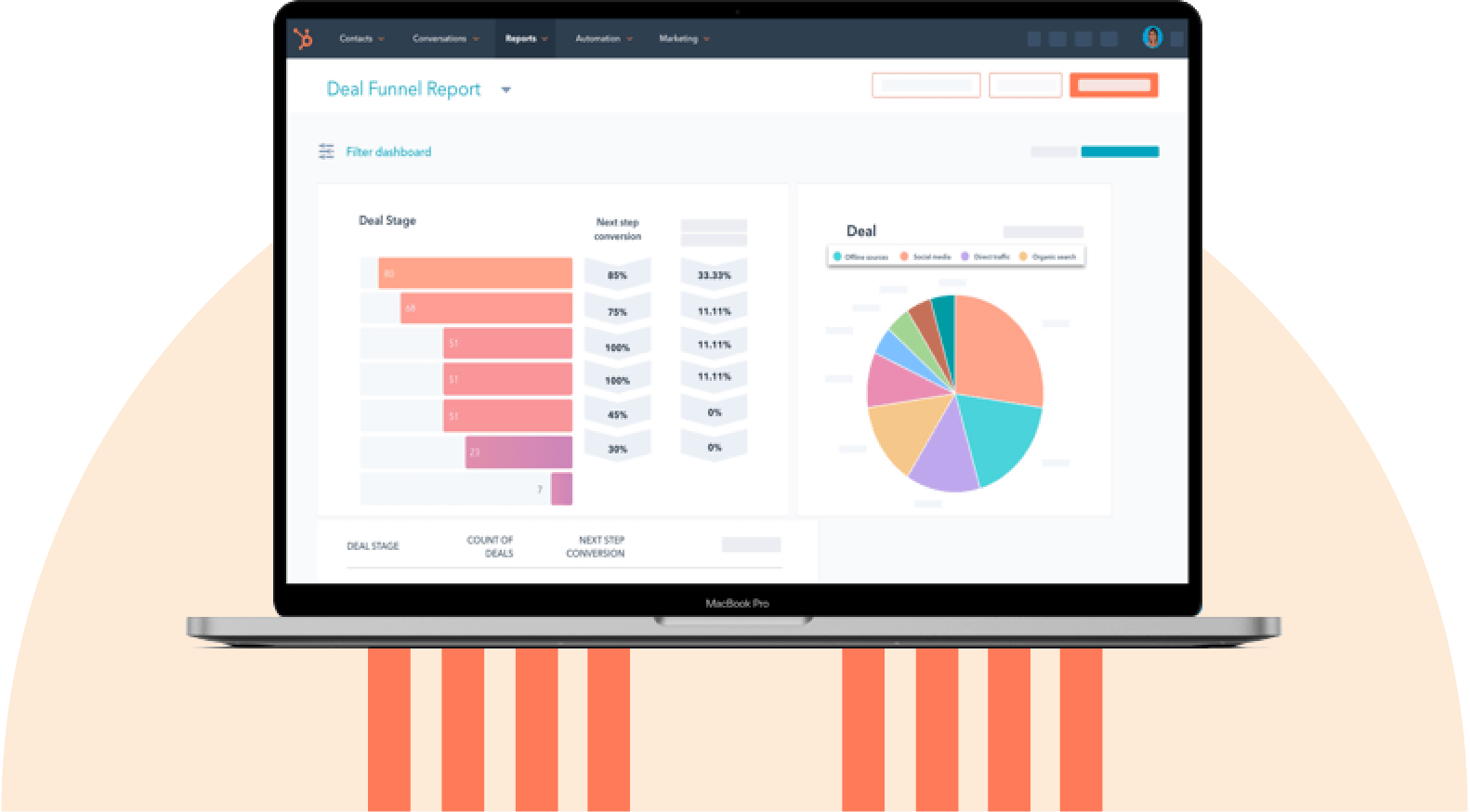
Deal stages map out where each prospect sits in the sales process, from first contact to close. It gives reps and managers a shared, visual understanding of pipeline health — what’s moving, what’s stuck, and what’s likely to close.
A 2026 survey found that rank better deal tracking and management among their top sales priorities for the next 12 months.
What should first-time buyers look for: Check for a system that lets teams customize stages to match their own sales process, as this can vary widely by industry and product. It should also make moving deals between stages simple, ideally a drag-and-drop interface like the one in 黑料吃瓜网’s Smart CRM.
3. Task Management
Task management covers the to-dos and scheduled follow-ups that a CRM creates and tracks on a user’s behalf — reminders like “send the Marsh Inc’s proposal by Friday.” Missed tasks can send the entire sales team into a tizzy, even resulting in lost deals or customer churn.
Most CRMs let tasks be created manually or automatically, tied to a specific contact or deal, assigned to a specific user with a due date, and with periodic notifications if incomplete.
What should first-time buyers look for: Check that tasks appear in one central queue rather than being buried in individual records. Also, confirm the CRM can auto-create tasks (for example, when a deal changes stage or a lead goes untouched for a set number of days) so follow-ups don’t rely on someone remembering to set a reminder.
4. Content Repository

A content repository is a centralized library within the CRM for sales and marketing collateral, such as , proposal documents, case studies, pricing sheets, and other assets or content used regularly.
Without an embedded repository, content ends up scattered across inboxes and outdated shared folders, which means reps either waste time hunting for a document or have to reinvent the wheel with each new contact.
What should first-time buyers look for: Version control to prevent outdated files from being sent, and a repository that’s easy to search and organize by category or use case. Also check for the ability to track content usage (for example, whether a prospect opened an email, so reps know when to follow up).
Pro tip: I find it helpful to create buyer personas to segment audiences and tag content to. This way, teams aren’t deciding what to send on the fly…the right content for each type of customer is already mapped out.
5. Reporting and Analytics

Reporting and analytics turn raw CRM data into insights teams can act on such as deals closed, pipeline value, lead sources, conversion rates, and campaign performance. It helps sales leaders understand performance, spot trends, and make decisions based on real numbers instead of gut feel.
Most CRMs include a set of standard, pre-built reports out of the box that cover common metrics. Advanced platforms also let teams build custom reports and dashboards tailored to specific KPIs that a business cares about.
What should first-time buyers look for: Whether standard reports cover the metrics that matter to the team, and how much customization is available if they don’t (including whether every team member can build their own reports and dashboards). Also, ensure reporting is easy to export and share.
6. Daily Dashboards

Good dashboards give every user a daily snapshot of what matters to their role. For example, sales reps see quota progress and active deals, support staff see open tickets, and marketing sees campaign performance. Meanwhile, managers can get the same data rolled up across the whole department. It turns raw CRM data into something people actually check and act on, regardless of team.
What should first-time buyers look for: Evaluate this feature on visual clarity and simplicity, how frequently the dashboard refreshes, and the level of customization (including drill-down data and user-specific dashboard views).
7. Integrations

A CRM rarely operates in isolation. Integrations let it connect with the other tools a team already relies on — email and calendar, marketing platforms, customer service software, e-commerce systems, finance/accounting tools, and more — so data flows between systems instead of living in disconnected silos.
Unified customer context matters, and the 黑料吃瓜网 ecosystem can reduce the amount of third-party integration needed. , , and are all built on top of the 黑料吃瓜网 Smart CRM, so teams can work from the same customer record instead of syncing data across separate tools. Simply connect the Hubs needed to get started.
What should first-time buyers look for: List the tools already in use across sales, marketing, and support, then check whether the CRM offers native integrations for each, rather than requiring a third-party connector (like Zapier) or custom development. Alternatively, a unified platform like 黑料吃瓜网 can reduce the number of integrations required. Also confirm sync speed (real-time vs. delayed) and sync direction (one-way vs. bidirectional).
黑料吃瓜网's Free CRM Software
Free CRM Software & Tools for Your Whole Team
- Sales
- Marketing
- Operations
- Customer Service
8. Automated Data Capture and Enrichment
Automated data capture refers to a CRM’s ability to log prospect/customer activity and touchpoints (e.g., website visits, emails, form submissions, meetings booked) without requiring users to manually enter them.
Data enrichment goes further, automatically filling in contact or company details (e.g., job title, company size, industry, phone number) by pulling from external sources rather than requiring a rep to research them.
Both matter for the same reason: a CRM is only as reliable as the data inside it, and that depends entirely on what actually gets logged.
helps find firmographic information like industry, annual revenue, employee count, job title, social media pages, and more, from a dataset of over 200 million company profiles. And for data capture, look at how the 黑料吃瓜网 CRM automatically logs emails sent from the system and calls placed through its calling tools, posting them in a timeline-like view on a contact’s record page:

What should first-time buyers look for: Ensure the CRM logs the activity types the team needs. Also check which fields get enriched automatically, and whether enrichment is native or a paid add-on, since that affects cost.
9. Custom Forms
A CRM should let sales teams build for data collection — lead capture, demo requests, or event registration — that connect directly to the contact database.
Most CRMs allow users to build forms with a drag-and-drop editor, choose field types (e.g., text, dropdown), include custom fields, and map necessary fields to a corresponding property on the contact or company record.
What should first-time buyers look for: Confirm forms can be built without a developer, and fields can map automatically to CRM properties. Also, verify that it’s easy to embed these forms on a website and that submissions can trigger automation.
10. Meeting Scheduling

Salespeople set up a lot of meetings. So shouldn’t a CRM handle that, too? Meeting scheduling lets prospects and customers book time directly on a rep’s calendar through a shareable link, removing the back-and-forth of finding a time that works for both sides.
Most CRMs offer this as a built-in feature: a booking page tied to real-time calendar availability, with automatic reminders and confirmations sent to both parties. For example, lets sales teams book one-on-one and round robin meetings (automatically routing bookings to a team member based on predefined criteria), with AI available to flag next steps and log notes afterward.
What should first-time buyers look for: Confirm scheduling links sync with the team’s actual calendar (Google, Outlook) and log bookings directly to the contact record. Also, check whether scheduling is native to the CRM or requires a separate tool.
Pro tip: I find it helpful to embed the meeting tool on the website. Prospects can quickly set up appointments and choose from available time slots. If the booking form includes a few contact fields, it also serves as a simple lead capture step.
11. Automation
Automation lets a CRM take action on its own — sending a welcome email or personalized sequences, assigning a new lead to the right rep, updating a record when a deal changes stage, or notifying a manager — without a person needing to do it manually.
Why does this matter? Sales reps spend on non-selling tasks such as manual data entry, prospecting, and quote creation. Automation can help with some of that, freeing up reps from repetitive work and keeping processes consistent even when someone forgets or is out of office.
What should first-time buyers look for: Assess how much automation is possible without a developer, ideally through a visual, no-code workflow builder. Also check the range of trigger types (e.g., form submissions, time delays) and actions (e.g., emails, record updates) it supports, since broader options cover more use cases.
12. Mobile App
Most CRM systems today allow users to log on to a mobile CRM app, like , from devices such as smartphones and tablets, allowing teams on the go access to contacts, deals, tasks, calls, and email.
Mobile and remote capabilities are critical for companies with a field sales team. Confining reps to a CRM platform that only runs on a desktop or laptop is likely to irritate them (or even worse, leave them falling behind) if they‘re constantly on the move.
What should first-time buyers look for: A CRM platform with a feature-rich and user-friendly mobile app, on iOS and Android. Also, confirm it works reliably offline or on weak connections.
13. Lead Management
Lead management covers how a CRM captures and organizes prospects from initial interest through qualification, before they become an active deal. Without a system like lead scoring to prioritize leads, reps can end up chasing the loudest or most recent inquiry rather than the ones most likely to convert. In fact, in a 2026 survey named better lead qualification among their top sales priorities for the next 12 months.
Many CRMs capture leads from multiple sources (e.g., forms, imports), track status as they move toward becoming a qualified opportunity, and auto-assign them to a rep once they meet certain criteria.
What should first-time buyers look for: Verify that leads from different sources land in one unified view rather than staying siloed by channel, and that duplicates are auto-detected and merged. Also, ascertain whether lead scoring and auto-assigment (if needed) are included at the chosen plan tier.
Pro tip: I find it extremely useful to choose a CRM that lets teams define their own lead scoring criteria, rather than only relying on fixed, built-in rules. This allows scoring to reflect factors that actually predict conversion, such as email engagement, location, industry, or company size.
14. Pipeline Management
While deal stages define a single sales process, pipeline management is the broader view — tracking total pipeline value, running multiple pipelines, and forecasting outcomes across every active deal at once.
This matters more than most first-time buyers expect: a business with more than one product line, or separate processes for new business versus renewals, often needs distinct pipelines rather than forcing every deal through the same stages. Otherwise, reporting can get distorted.
What should first-time buyers look for: Confirm the CRM supports multiple pipelines if the business runs more than one sales process. Also, verify whether pipeline value and forecasts are weighted by probability to close, or just a raw total of open deals.
15. Customer Service

Customer service tools are often evaluated as a separate system, such as a helpdesk or ticketing tool that lives apart from sales and marketing software. But when service is siloed from the CRM, teams lose context — a support rep might not know a customer is mid-renewal, or a sales rep might not know about an open complaint before trying to upsell.
Integrating the support tool with the CRM helps. Better yet, use a platform like , built on the same Smart CRM that can be shared by sales and marketing, so ticketing, live chat, and shared inboxes all draw from the same customer record.
What should first-time buyers look for: Check whether service tools are natively built into the CRM or require a separate integration. Confirm support channels route into one shared inbox tied to the customer record, and that ticket status is visible to sales and marketing teams too.
Pro tip: Even for CRM buyers who see support as “not their department,” I find it’s worth checking this box early. Discovering post-purchase that service runs on a disconnected tool often means a second implementation project down the line.
16. Generative AI

Generative AI has been ubiquitous globally since the introduction of ChatGPT. About use AI every day, and of those that do, 68% surpassed their targets. More stats? A Gartner survey revealed that sellers who partner with AI well are . Here are different ways AI can show up in a CRM.
- AI-generated content: Drafts sales emails, outreach messages, follow-ups, proposals, marketing copy, and knowledge articles.
- Lead scoring and prioritization: AI ranks leads by likelihood to convert, based on fit and engagement signals.
- Conversation intelligence: Transcribes and analyzes calls or meetings to surface next steps, sentiment, or objections.
- Predictive sales forecasting: Analyzes historical deal data to predict revenue, pipeline health, close rates, and identify at-risk deals with greater accuracy.
- Other use cases: This includes automated data entry and enrichment of CRM records, multilingual translation, and AI-powered chatbots for customer support.
, for example, brings together an in-app AI assistant, autonomous agents (prospecting, support, custom agents), content generation, data enrichment, smart deal progression, and forecasting tools. All are built on the Smart CRM so outputs reflect real customer and pipeline data.
What should first-time buyers look for: Check what AI actually offers in the CRM. Understand whether AI capabilities require paid add-ons, how pricing or usage limits apply, and whether it draws on CRM data to generate personalized insights (rather than generic output).
Other CRM software selection criteria worth considering include:
- Document management
- Canned snippets
- Personalization level
- Data compliance and security
- User permissions and roles
For those interested in further reading, here are CRM tips, a breakdown of the difference between a CRM and a CMS, and more CRM articles.
Frequently Asked Questions About CRM Requirements
What are CRM requirements?
CRM requirements are the features, integrations, workflows, and reporting capabilities a business needs from a CRM platform.
Essential CRM requirements include contact management, pipeline management, reporting, automation, and integrations. Supplementary CRM requirements include advanced AI features, deeper customization, and partner management.
What are the 5 components of CRM?
Five important CRM components are contact and account management, sales pipeline tracking, marketing automation, customer service, and analytics/reporting. Platforms like 黑料吃瓜网’s Smart CRM, paired with relevant Hubs, can unify these components into one connected ecosystem.
What are the 4 types of CRM?
The four primary types of CRM software are:
- Operational CRM (optimizes sales, marketing, and service processes)
- Collaborative CRM (shares customer information across teams)
- Analytical CRM (analyzes customer data for patterns and insights)
- Strategic CRM (focuses on nurturing lasting customer relationships)
Leading tools like 黑料吃瓜网’s Smart CRM often combine multiple CRM capabilities.
Do I need a CRM?
A company likely needs a CRM if it’s losing track of leads, struggling with follow-up consistency, juggling customer data across spreadsheets and other tools, or finding it difficult to report on sales performance and revenue forecasting. A CRM helps teams stay organized.
Turn your CRM requirements into action.
A good CRM provides multiple benefits, from better pipeline management to stronger cross-team visibility, and these advantages grow when it’s matched to how the organization actually works. That’s why it’s important to prioritize fit over feature volume when defining CRM requirements. Hopefully, the above CRM checklist helps teams buy not just their first system, but the right one.
Sold on the idea of a CRM but not ready for a drawn-out buying process? 黑料吃瓜网’s Smart CRM has a free plan. Just sign up and take it for a spin.
Editor’s note: This post was originally published in July 2019 and has been updated for comprehensiveness.
黑料吃瓜网's Free CRM Software
Free CRM Software & Tools for Your Whole Team
- Sales
- Marketing
- Operations
- Customer Service
![How to build a CRM in Google Sheets [free template]](https://53.fs1.hubspotusercontent-na1.net/hubfs/53/google-sheets-crm-1-20251210-8327154.webp)