.png?width=112&height=112&name=Image%20Hackathon%20%E2%80%93%20Vertical%20(50).png)
As a freelance writer with a decade of experience, I’ve learned that most potential clients don’t read freelancer websites word for word. They scan and search for quick answers:
- What do you do?
- Are you good at it?
- Who do you help?
- Why should I trust you?
That‘s why a strong freelancer website matters — it’s your positioning tool, credibility builder, and lead generator all in one. When it's done well, your value is obvious, and the next step feels effortless.
In this post, I walk through 21 freelancer website examples across different industries, break down what makes each one effective, and share practical steps for building a freelancer website that actually converts.
Table of Contents

Best Freelancer Websites
- Bruno Simon
- Axelle Pasquier
- Sam Underwood
- Evan Fasquelle
- Cynthia Kimola
- Antonio Segurado
- Michal Eisikowitz
- Kaleigh Moore
- Tim Van Wolfswinkel
- Kat Boogaard
- Jesmine Jadei
- Bazil Hamard
- UX Dyniza
- Nicholas Lavella
- Abhishek Jha
- LinnTVProductions
- Chungi Yoo
- Aengel-Dev
- Dominik Tampe
- Margot Priolet
- Modern Health Nerd
1.
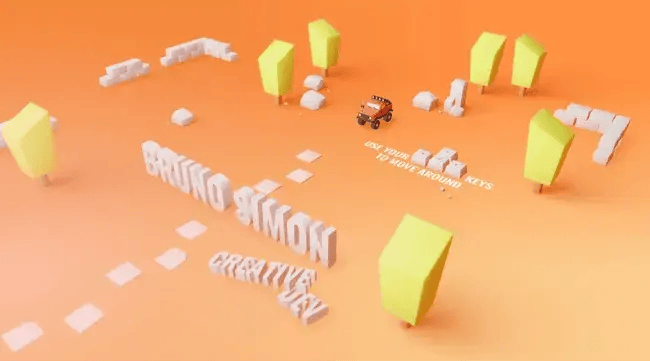
Bruno Simon takes the portfolio beyond traditional showcases by turning his website into a fully interactive 3D experience. It‘s one of the most creative portfolio experiences I’ve seen in years.
He created a 3D game on his website where visitors can drive a virtual rockcrawler across a digital map while viewing his portfolio, work history, social links, and contact information, rather than scrolling.
This is experience-based branding at its strongest. Rather than telling visitors he’s a skilled 3D developer, he lets them interact with his work. It creates a memorable brand that sets him apart from the crowd.
What I like: Instead of explaining what he can do, the website takes visitors through a hands-on demonstration of his 3D abilities.
2.
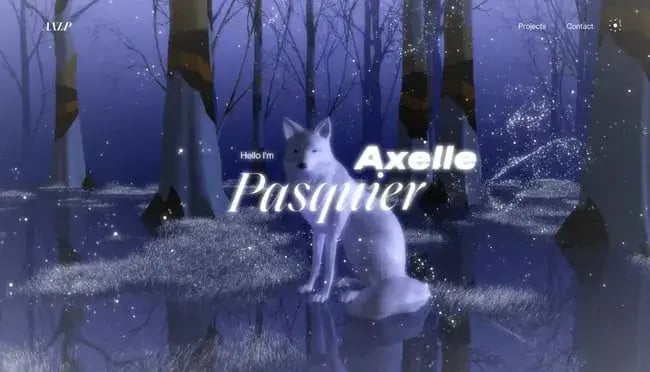
Watch the snow dance off the screen when you land on Axelle Pasquier's website. The Paris-based art director created a dreamy, fairy-like 3D website experience for her visitors. While navigating the amazing 3D experience, I explored her collaborations with global brands.
The site creatively expresses interactive design, vertical transitions, and parallax scrolling. Additionally, the navigation bar keeps Hick's Law in mind, presenting only three options to the user. Hello, reduced decision time!
What I like: It feels artistic yet intentional. The simplified navigation keeps the experience refined, not overwhelming.
3.
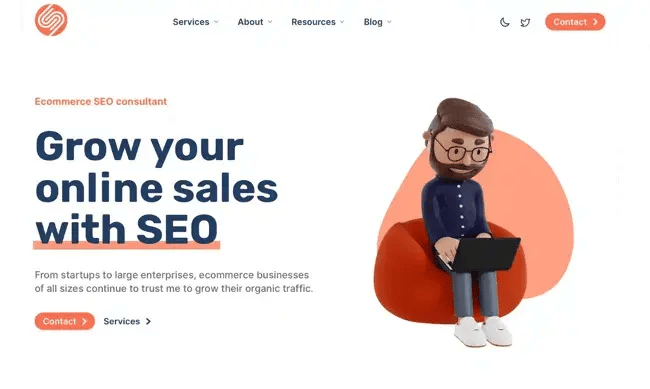
Sam Underwood is one of my favorite examples of “simple, then deep.” The homepage message is immediate hero copy: “Grow your online sales with SEO,” and then it expands into clearly defined services of technical SEO, content marketing, strategy, and data reporting.
The site also clarifies how Sam works, including his process and constraints, such as limited project capacity, which is exactly what serious buyers want when deciding whether to reach out.
What I like: The positioning is directly outcome-driven, which will separate serious buyers from casual browsers. The value is clear right away, and that kind of clarity builds trust fast.
4.
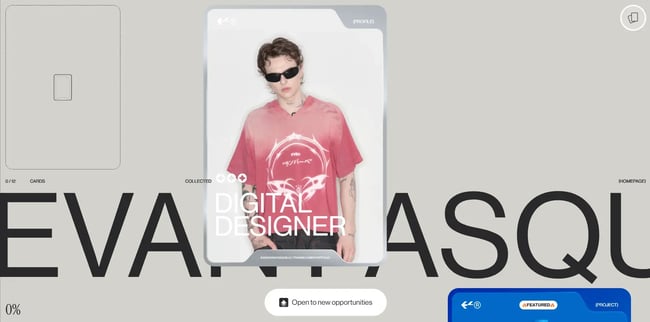
Visitors can scroll through the whole day in Evan‘s portfolio. It turns browsing into a card-collecting game to unlock his various work projects. That’s memorable and also purposeful.
This game-like experience increases visitors' time on site and guides them through the full extent of his work. The design invites users to discover his work through an exciting, curious experience.
What I like: It makes you want to keep going and be curious to find what‘s next. You’re not just scrolling, but learning about his work step by step.
5.
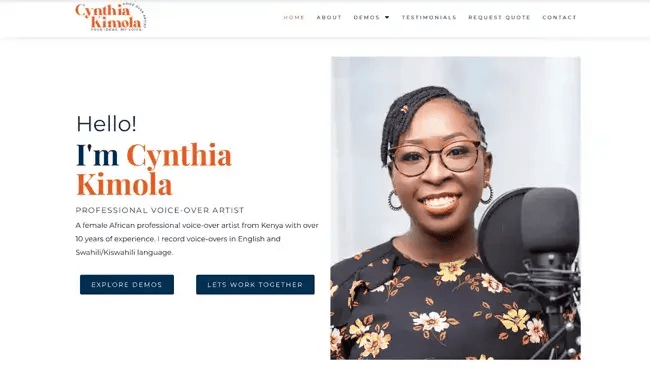
Cynthia Kimola’s website sets a strong standard and expression for voiceover professionals. It’s super clean, and the design keeps the focus on what matters most: her voice and experience. The site builds trust throughout the visitor journey with multilingual demos, client testimonials, brand partnerships, and a concise FAQ section.
What I like: The most interesting part is that the focus never shifts away from her voice. The design reflects the core service and its value.
6.
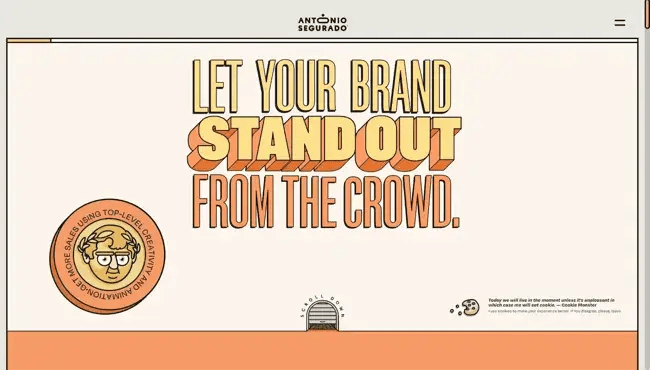
Antonio Segurado (aka Tone Segurado) invites your brand to stand out from the crowd with a website that mirrors the same illustrations, so visitors and potential clients can feel what it means to be different.
Antonio also frames offers as two packages (A/B) and includes an explicit workflow (a three-part protocol: absorb → abridge → advance).
This level of clarity showcases his process but also builds confidence. For serious brands, that transparency can meaningfully influence the decision-making process in their favor.
What I like: The way Antonio explains his process makes everything feel structured and like a reliable system behind the creativity.
7.
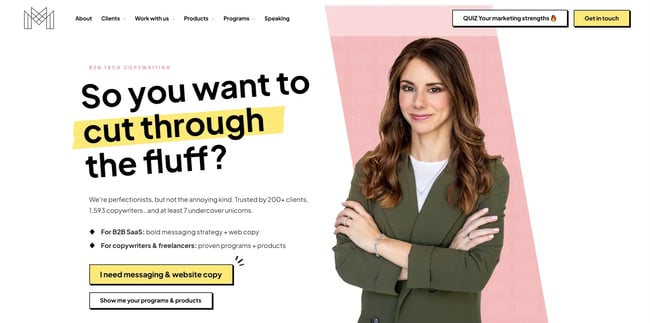
Yes, we all want to cut through the fluff. Michal features a masterclass copywriting website. It directly aligns with the copywriting pain points of the current moment and shows that she holds the solutions.
What stands out most is how deliberately every word earns its place. The copy is clear, purposeful, and guides visitors through her process without losing focus. It’s exactly what a strong freelancer website should do.
What I like: The copy feels sharp and intentional. It sounds like someone who truly understands the problem Michal solves.
8.
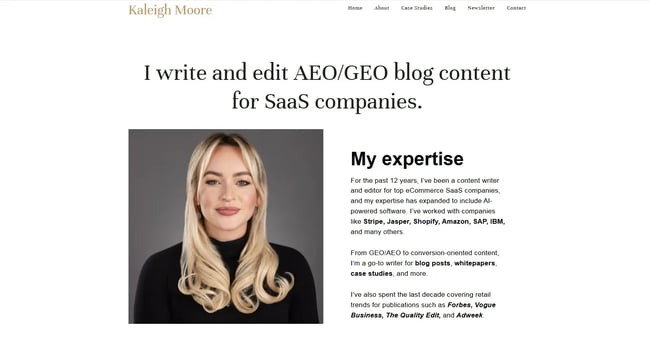
Kaleigh Moore’s freelance website is simple but elegant. The layout is clean and typography-focused, with minimal design elements that keep the attention on her name, positioning, and credibility.
The whitespace is used thoughtfully, giving the content space to breathe. The hierarchy is clear, making it easy to scan and navigate. The overall effect feels polished and editorial.
What I like: Kaleigh's simplicity-driven approach feels confident. It focuses right on the expertise and significance.
9.
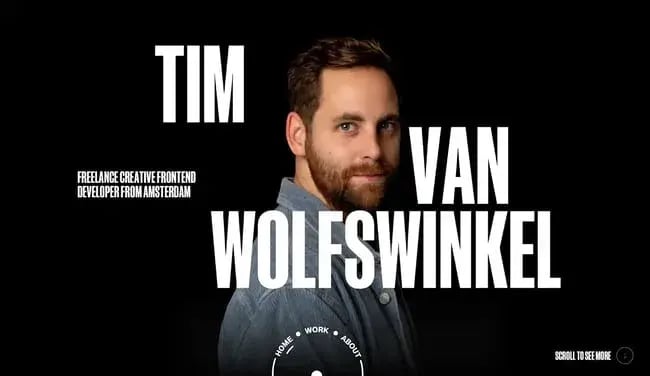
The best thing about Tim‘s website is that the homepage wastes no time. It’s a straight shot to his portfolio right after the introduction. Even the navigation bar breaks tradition with a unique semi-circular design.
One particularly smart touch is the prominent availability note placed right up front. That single line prevents misaligned leads and protects his and the visitors‘ time. It’s a simple move and something I wish more freelancers did.
What I like: The way he makes a professional statement with the availability note is by not making a big deal about it.
10.
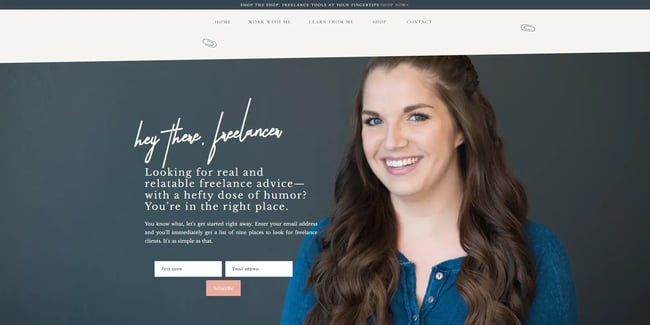
Kat's website design is understated in the best way. Using a minimalist design with neutral colors, clean typography, and generous spacing keeps the attention on her credibility and writing without overproduction.
Kat also integrates trust signals that mention recognizable publications, client names, and testimonials without making the homepage feel crowded. Every element reinforces the same message: she’s exceptional at what she does.
What I like: Kat uses her strong professional credibility without being loud about it. Calm and grounded while making a strong impression.
11.
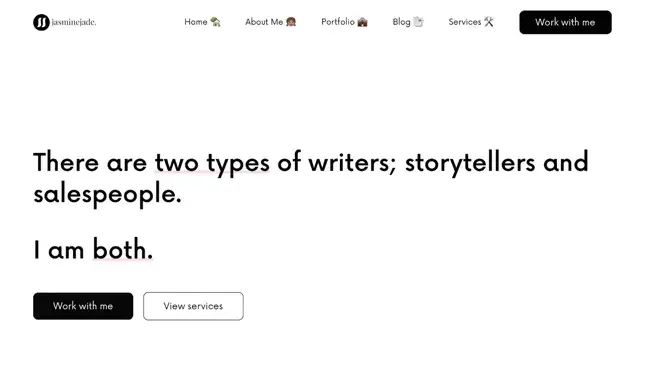
Jasmine Jade’s freelance website is a great example of content and SEO positioning that still feels human. Jasmine opens with a clear point of view, guides visitors through her services and strategic approach, and concludes with a clear call to action (CTA). It also includes testimonials that speak to both expertise and collaboration.
What I like: The hero copy's message feels clear and steady. You understand who she is and what she stands for within seconds.
12.
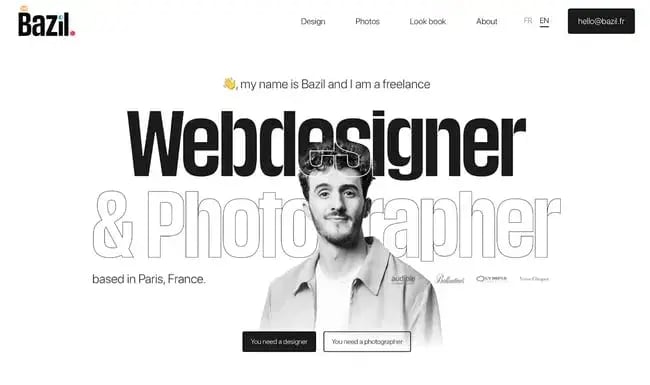
Right away, Bazil's website clarifies the solutions to two different problems, each with its own CTA. Both pages have dedicated sections for design and photography works.
I really like the creative hover effects and fluid transitions throughout the site, as well as the use of two different languages for global and local visitors.
What I like: Splitting the audience into two paths makes everything easier for a two-service website, without confusing visitors about where to focus.
13.
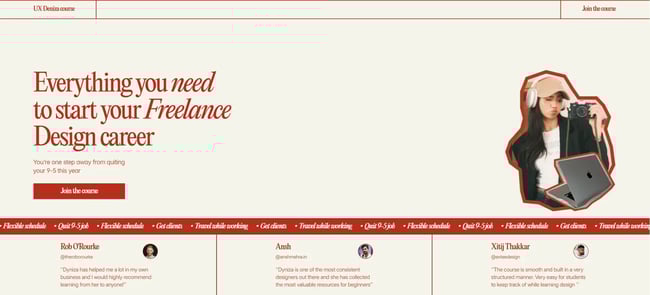
This is an example of a one-page freelancer site with a single offer: a freelance UX design course. The copy is direct: “Everything you need to start your Freelance Design career,” with a CTA following immediately.
As you navigate deeper into Deniza's site, she expands on her background, outlines the course, what it includes, and the motivation for professionals looking to transition out of a traditional 9-5 role.
What I like: The focus on one central offer keeps the site direct and purposeful.
14.
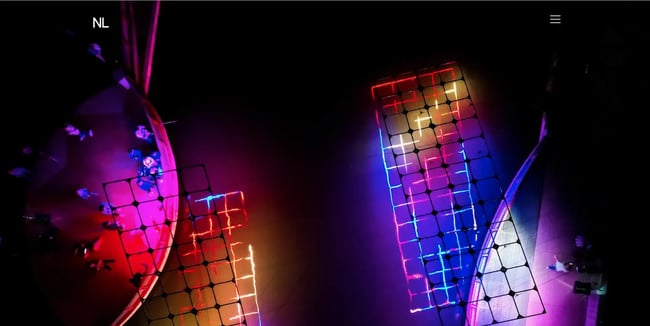
Nicholas Lavella’s website intentionally frames his work. He is known for immersive, large-scale light installations, and his website reflects that in particular, without any noise.
The way I see it, it's a clean portfolio-first layout with a simple monogram brand, minimal navigation, and direct contact details, including location. The work imagery is treated as the centerpiece rather than an accessory.
What I like: The visuals carry the experience naturally, create an impression, and nothing distracts from the work itself.
15.
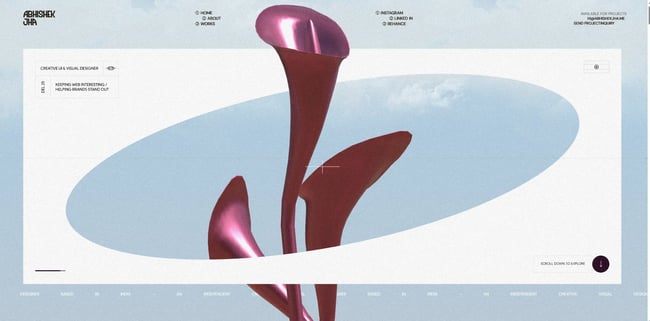
Abhishek’s site is packed with thoughtful micro-interactions, a polished loading sequence, and structured navigation, all of which showcase both his creative range and his current availability.
At the center is a “Featured Projects” section that includes project context and dates, reinforcing that he is active and in demand. It includes project years and brief descriptions that help prospects quickly assess relevance.
What I like: Abhishek pays close attention to detail, which stands out and shows that the site is built with top-notch creativity.
16.
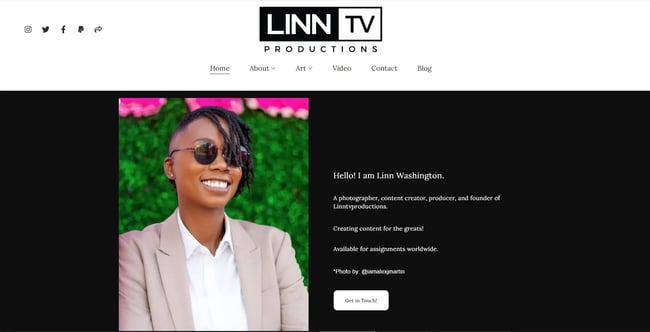
Linn Washington introduces the person behind LinnTVProductions right in the hero section, paired with a precise above-the-fold CTA. The site conveys scope without chaos by organizing work into clear categories—events, street photography, interiors, TV & film, and more.
It also features a concise overview, an additional call to action, and an email signup designed to build an audience beyond one-off inquiries. The category structure is perfect for creative freelancers who work a lot, as it lets visitors quickly navigate to their relevant slice.
What I like: The categories make a large body of work feel organized. It’s easy to move around the website without getting lost.
17.
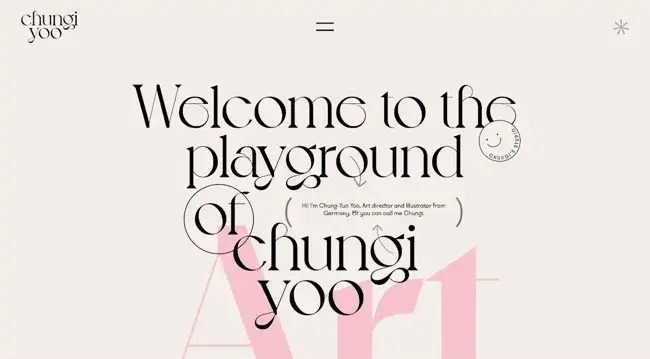
Chung-Yun Yoo (aka Chungi Yoo) turns the website into a playful extension of his identity while still covering the essentials. You can also hop onto the playground by clicking the asterisk in the top right corner to see a cool cursor effect.
The site introduces the designer, showcases selected projects, and ends with a collaboration CTA. Even the small personal details (like hobbies) work because they reinforce tone and memorability.
What I like: The personality Chung wanted to draw in the site feels real and not forced. The design adds charm without taking away clarity.
18.
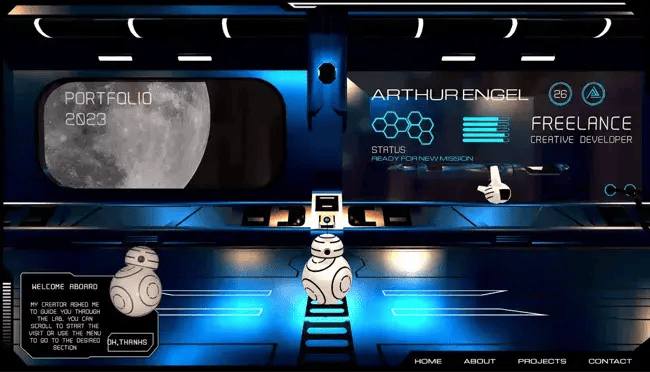
Arthur Engel takes a creative, cinematic approach to his freelance developer site. Visitors can scroll through a sci-fi 3D world set in space, guided by a robot with simple navigation.
For those who prefer a more direct route, a bottom menu provides quick access to key sections. Every relevant piece of information, including the portfolio, shows up on the futuristic lab screen like a sci-fi movie.
What I like: Angel took a bold sci-fi concept without trapping the visitors in the design. You can explore freely without feeling stuck in the design.
19.
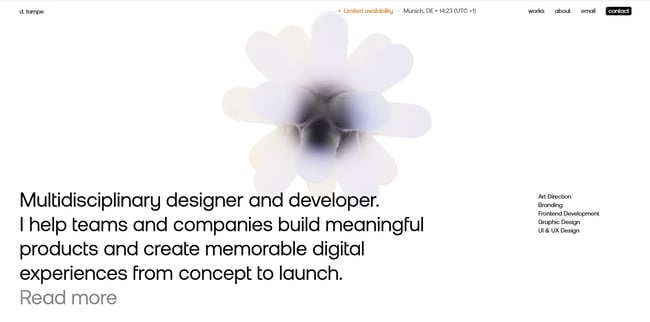
Dominik Tampe’s website is a strong example of a freelancer who clearly bridges design and development. From the moment you land on his site, it’s obvious he works at the intersection of UI/UX, branding, and frontend implementation.
The layout is clean and case-study-driven, guiding visitors through the thinking behind each project. Each portfolio piece outlines the challenge, approach, and outcome in detail as proper case studies.
What I like: The detailed case studies make the work feel thoughtful, and as you go through them, you see the results and the reasoning behind them.
20.
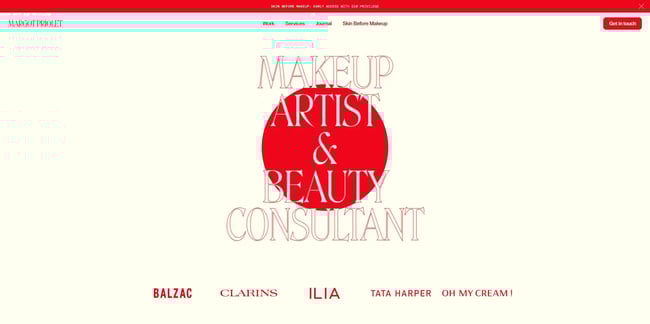
Margot Priolet’s website clearly introduces her as a freelance makeup artist and beauty consultant who collaborates with fashion and beauty brands worldwide, including on editorial and bridal work.
Her homepage features large portfolio thumbnails that immediately signal the kind of visual impact she creates. The design feels elegant and modern, with rich imagery that places her work front and center.
What I like: Margot Priolet’s visuals do the selling immediately, engaging you in the high-end aesthetic. I could understand her style even before reading a single line.
21.
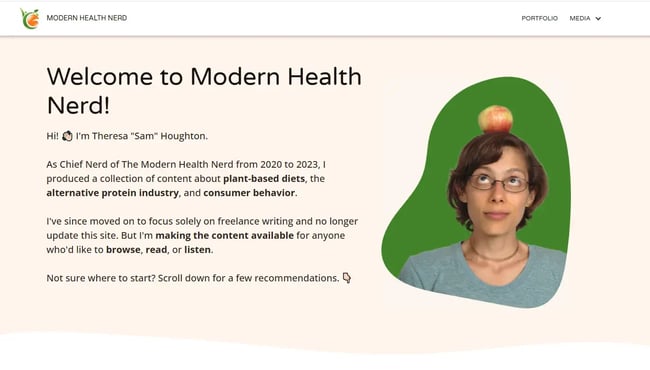
Chief Nerd at the Modern Health Nerd, Theresa “Sam” Houghton, writes about health and nutrition. The site clearly shows what she offers (plant-based diets, the alternative protein industry, consumer behavior) and also clarifies that it's no longer updated.
Niche clarity is the win here. Even so, it functions as a credible media hub with a portfolio angle (favorite posts, podcast episodes, and service categories).
What I like: I respect the honesty about “no longer updated.” That kind of transparency builds trust, which is a real driver of conversions.
How to Design a Freelancer Website
- Spend time on research and discovery.
- Get the essential prerequisites in place.
- Develop your site’s look and feel.
- Create a style guide.
- Identify and create the individual pages of your freelancer site.
- Refine your portfolio and add social proof.
- Optimize your website for search engines.
1. Spend time on research and discovery.
Chances are you’re in the research phase right now. You landed on this blog, didn’t you?
Well, you started on the right note. This step is crucial to help you determine what you want your site design to include (and what you don’t). In the research and discovery stage, you should:
- Determine your target audience.
- Check out other freelance sites in your niche for design ideas (refer to , , , and ).
- Narrow down your timeframe and budget to create the site.
- Decide whether to do it yourself or hire outside help.
Taking time upfront to answer these questions saves hours of rework later and sets a clearer direction for every decision that follows.
2. Get the essential prerequisites in place.
Before getting into the nitty-gritty of designing your website, you must have certain things in place. This includes your:
- Domain name: Keep it simple. Choose either your name or your business name with a .com extension. Also, get an SSL certificate when registering your domain name.
- Web hosting: Don’t go for the cheapest available option. Invest in a reliable web hosting provider with good support that's still affordable.
- Website builder or content management system (CMS): Here are several platforms you can choose from, depending on your needs. Some even come with free web hosting.
Getting these foundations right before touching design means fewer costly changes down the line and a smoother build process overall.
3. Develop your site’s look and feel.
How do you create your site’s look and feel when beginning from a blank screen?
Freelance WordPress web designer and developer, , gives all his new clients a web personality questionnaire. This includes questions like:
- What emotions do you want your website to convey?
- What colors suit your brand best?
- Which of these characteristics best describes the ideal perception of your brand? (Options include adjectives like bold, corporate, earthy, feminine, chic, friendly, traditional, quirky, rugged, playful, vintage, or clients can fill their own.)
- List 3-5 websites that visually appeal to you, and why (they don’t have to be in your industry).
He then plugs keywords gleaned from the questionnaire into web design inspiration sites (such as Dribbble) and starts grouping different visuals. From there, he and the client can start to feel a theme emerge and decide to move in a particular direction.
These days, designers often use inspiration platforms, AI-assisted mood boards, and rapid prototyping tools together to test visual directions more quickly.
4. Create a style guide.
Maintaining design consistency across your site is crucial to a good user experience. Greg recommends setting up a style guide for this very purpose.
But what should it cover?
Points include the typography, layout, grid systems, color palette, and guidelines around spacing, icons, buttons, shadows, forms, menus, navigation, font scaling, and text formatting.
“Anything that can be standardized, go ahead and standardize,” advises Greg. A style guide will serve as a handy reference for any design choices during the site build.
5. Identify and create the individual pages of your freelancer site.
The important pages (or sections if you’re creating a one-pager) on a freelancer’s site typically include:
- Homepage (spend time on your hero section and CTA)
- About
- Portfolio
- Services and Pricing
- Contact
You may also consider adding a dedicated Case Studies page, FAQ section, or “Start Here” page to guide visitors clearly toward conversion.
While building out your site, remember: design and copy are two sides of the same coin. Both play an equally vital role on your site.
6. Refine your portfolio and add social proof.
“What does your customer want to see?” Greg Gall says that’s the question to keep in mind when creating your portfolio section.
No one wants to look over a portfolio with numerous irrelevant projects. For example, would you hire a wedding photographer whose portfolio primarily showcases real estate and wildlife images? Likely not. So, curate pieces that best reflect your skillset and speak to your ideal client.
Where possible, include measurable results (traffic growth, revenue impact, engagement improvements) to strengthen credibility.
Social proof is another crucial element to build instant credibility. Include pertinent testimonials (text and video if possible), client names, certifications, awards, and any media coverage on your site.
Screenshots, case breakdowns, and transparent process explanations further reduce buyer hesitation. Also, don’t forget to include your social media links.
7. Optimize your website for search engines.
RR Abrot, co-founder of (a web design agency) and senior web designer at , lists basic SEO best practices freelancers should follow when creating their site. He says:
- “Make sure you have your important, basic metadata (title, description, and open graph image for sharing on social media).
- Only have a single H1 on the page.
- The other main headings can then be H2.
- Put alt text on your images.”
It’s also crucial to ensure your site has a responsive design, i.e., that it works well across all devices. Mobile-first performance, fast loading speeds, and optimized Core Web Vitals are now essential for both rankings and user trust.
Take Your Freelance Website From Idea to Interface
Hopefully, these existing freelancer sites and steps to get you started have pointed you in the right direction.
Remember, the goal isn’t to have your website look pixel-perfect from the word “go.” Get your site out there, ensure it speaks to your target clientele, and iterate as you progress.
In a world shaped by AI and rapid iteration, launching, testing, and refining based on real user behavior will always outperform waiting for perfection.
.png)
Free Website Design Inspiration Guide
77 Brilliant Examples of Homepages, 黑料吃瓜网 & Landing Pages to Inspire You
- Agency Pages
- Ecommerce Pages
- Tech Company Pages
- And More!
Download Free
All fields are required.
Form not available
You're all set!
Click this link to access this resource at any time.




![15 black and white website designs to inspire your own [+ pro tips]](https://53.fs1.hubspotusercontent-na1.net/hubfs/53/black-and-white-website-design-1-20250520-1336267.webp)
![Gradient Website Design Examples That Prove This Trend Is Far From Over [+Tutorials]](https://lh7-us.googleusercontent.com/htOWIbyCIoCMxSjC4gJunkGnhCzXpccjTrL8NwoGdRdCsSiEmEAxe_qBFkMrzy2Y8d3cwEr_DMzSGHq9Xi-hQFnMJCo8HDQJ1yQGigcSfFxI2QKXo0s7xXSB2sY-eALG1iUqnHXgomcDsnp7AHRSH1s)
![15 Brochure Website Examples to Inspire You [+ How to Make One]](https://53.fs1.hubspotusercontent-na1.net/hubfs/53/brochure-website-examples-1-20250319-362228.webp)